











Cloud visitor management system: from check-in to access control
Table of contents
- What is a cloud visitor management system?
- The purpose of a visitor management system
- How a cloud-based visitor management system works?
- Choosing the best cloud-based visitor management system
- Must-have features of visitor management software
- What cloud-based visitor management software should automate and support?
- Why are enterprises moving visitor management to the cloud?
- Industry use cases for cloud-based visitor management
- Best cloud-based visitor management solutions
- Practical buyer’s checklist
- Where IDCUBE ezvisit10 fits in?
- Frequently asked questions
- Final Takeaway
In many enterprises, visitor management still operates as a local, front-desk process. A visitor may be signed in, issued a badge, and announced to the host, but the system often stops there.
Traditional visitor management tools usually solve the first step of entry, but not the full visitor journey. The front desk may capture the entry, but security teams may still struggle to see approvals, compare activity across locations, or connect the visitor record with actual access events. That becomes a problem when someone has to review the visit later.
Security teams may know that someone entered the building, but not always whether the visit followed policy. Whether the credential is still valid or the record is reliable enough for an audit or review of the incident.
That gap is why enterprises are moving visitor operations into the cloud.
A cloud visitor management system replaces manual sign-in sheets, isolated reception tools, and ad hoc host approvals with a controlled digital process, involving register the visitor, route approvals, issue a credential, validate entry, and keep a searchable record.
The shift to cloud is not only about a cleaner lobby. It is also about the governance.
Security leaders need to know who is on-site.
Facility teams need faster entry without losing control.
IT teams need deployment choices that respect internal architecture.
Procurement teams need vendors that can prove security, privacy, and operational fit.
This blog article explains how a cloud visitor management system works, which features to evaluate, how the cloud compares with on-premises and hybrid deployments, and where IDCUBE’s ezvisit10 fits for enterprises that want visitor management connected to access control rather than treated as a standalone check-in screen.
What is a cloud visitor management system?
A cloud visitor management system helps organizations manage visitor entry through a web-based platform. It supports the full process of registering visitors, getting approvals, verifying identity, tracking movement, and reviewing visit records when required. Since the workflows and records sit in the cloud, authorized teams can manage check-ins, digital passes, approvals, dashboards, and reports across a single office or multiple sites.
In simple terms, it brings visitor entry under a more controlled identity process.
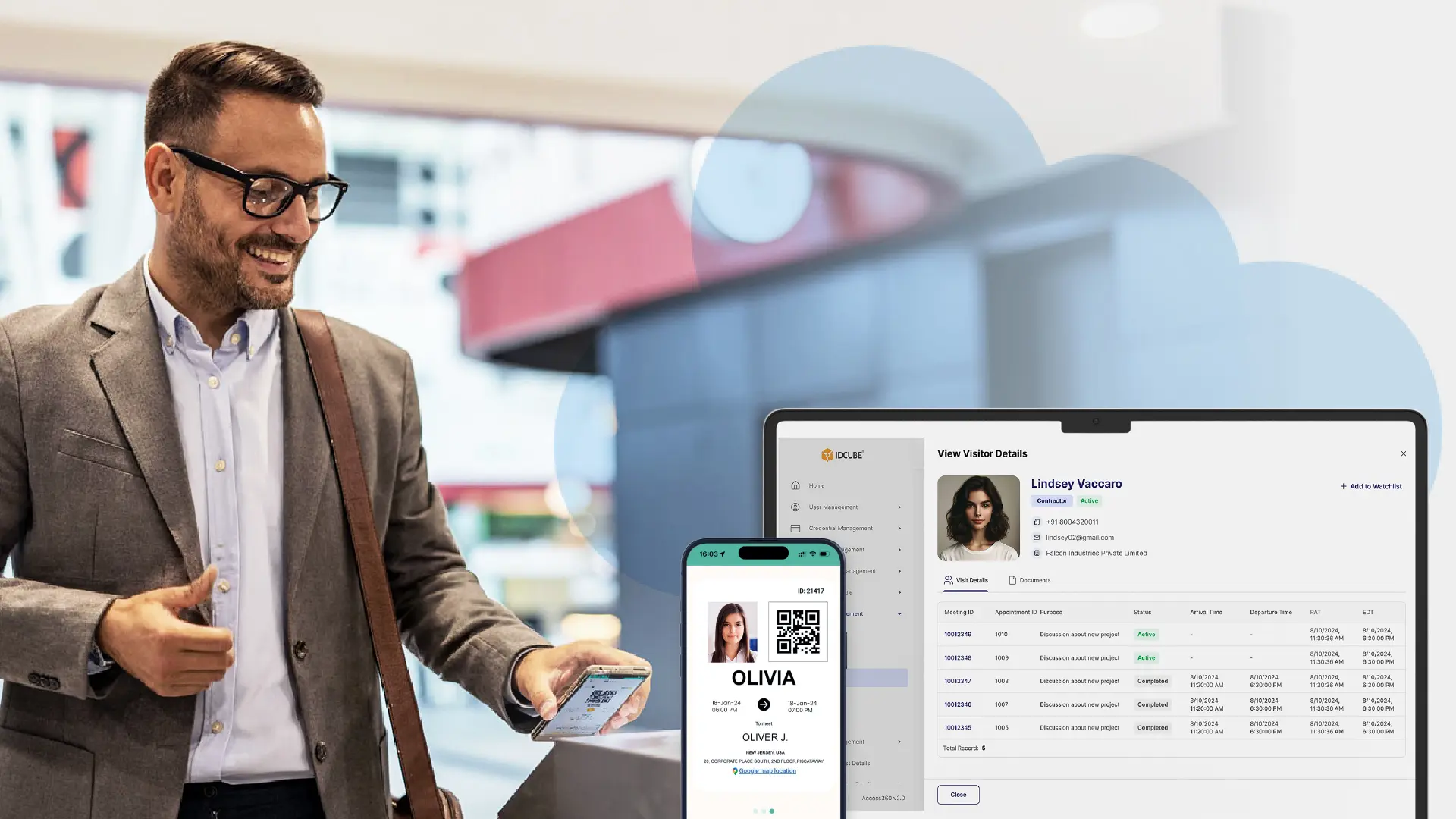
A guest can be invited before arrival, approved by the host or security team, issued a QR-based visitor pass, checked in at a kiosk or entry point, and recorded automatically for future review.
Traditional visitor logs depend on the visitor writing accurate information and the front desk enforcing every rule manually.
A modern cloud-based visitor management software platform gives security, facilities, and IT teams more structure. It can apply different rules for a job candidate, vendor, contractor, auditor, executive guest, delivery contact, or walk-in visitor.
The cloud matters because visitor management is no longer limited to a single desk.
Enterprises run multiple offices, industrial sites, campuses, residential towers, data centers, and shared workspaces.
A cloud platform gives central teams visibility without forcing every location to operate as an isolated island.
The purpose of a visitor management system
The purpose of visitor management system software is to answer five questions with confidence:
- Who is requesting entry?
- Why are they visiting?
- Who approved the visit?
- Where and when are they allowed to enter?
- What record exists after the visit?
Those questions sound simple until a facility handles hundreds or thousands of visitor events each week.
In a corporate headquarters, the same reception area may handle interview candidates, customers, vendors, auditors, service technicians, contractors, delivery partners, and board guests.
In a data center, the process usually needs to be stricter, with stronger validation, escort rules, and access-zone control.
A healthcare or BFSI facility may need cleaner audit trails and stronger privacy handling.
Good visitor management software reduces ambiguity.
It gives hosts a defined way to invite people. It gives reception and security staff a clear approval status. It gives visitors a faster and more professional arrival experience. It gives compliance teams searchable visitor records rather than loose paper, spreadsheet exports, or unverified badge logs.
The result is not just a digital visitor log.
It is a repeatable operating model for non-employee access.
How does a cloud-based visitor management system work?
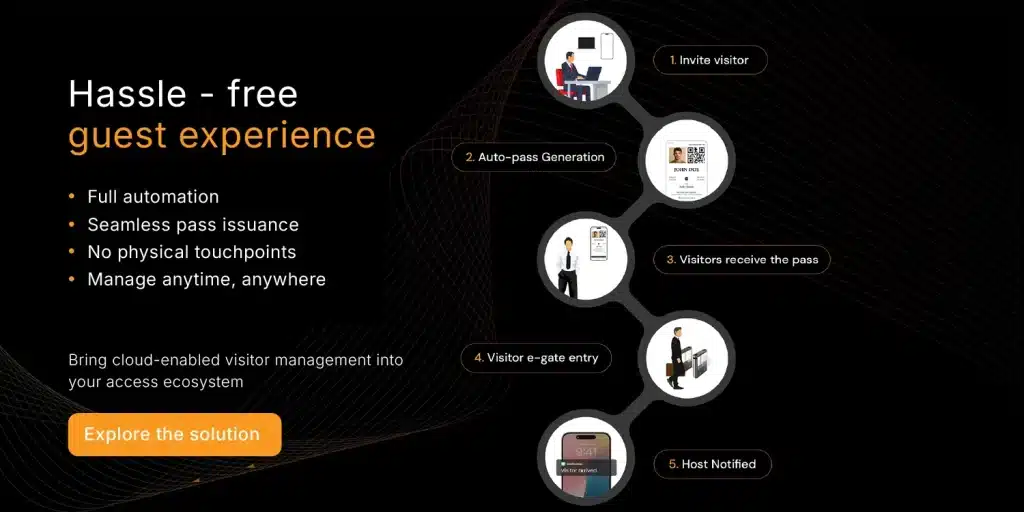
A cloud-based visitor management system usually follows the same lifecycle: registration, approval, credentialing, check-in, access validation, monitoring, and recordkeeping.
The difference between basic tools and enterprise-grade platforms rests with how deeply each step is configured.
1. Registration or invitation. The visit may begin with a host invitation, a visitor-submitted request, or a direct walk-in at the front desk. This distinction matters. A scheduled executive meeting should not follow the same path as an unplanned contractor arrival at a critical facility.
2. Approval routing. Once the visit is created, it should reach the person or team responsible for clearing it. For a simple office meeting, approval from the host may be enough. If the visitor is a contractor, vendor, auditor, or someone going into a restricted area, security or admin may need to review the request before the person is allowed in.
3. Digital credential issuance. After approval, the system issues a temporary credential, often a QR-based visitor pass. In the case of IDCUBE ezvisit10, visitor passes are QR-based and can be delivered by email, SMS, or the GreenID app, reducing reliance on the uses of printed passes.
4. Arrival & check-in. When the visitor arrives, check-in does not have to happen in only one way. It may be done at a kiosk, through the app, at reception, at the security desk, or at the entry point itself. In a busy office, self-check-in can help avoid a queue. In a stricter facility, the guard can still check the visitor before allowing entry.
5. Access validation. When visitor management connects with access control, the visitor credential can be validated against entry rules. This is the difference between “visitor recorded” and “visitor access governed.” The second is far more useful for enterprise security.
6. Monitoring and analytics. Once the visitor is reached and check-in is done, the security and facility teams can review what is happening at the site instead of waiting for manual updates. They can monitor and analyse – current visitor activity, approvals that are still open, past visit records, and entry trends. Over time, this helps them notice busy arrival hours, repeated visitor types, and the points where the process is slowing down.
IDCUBE’s workflow model is a useful example of enterprise nuance.
ezvisit10 includes 10 predefined workflows across three categories: Host-Initiated, Visitor-Initiated, and Direct Walk-In.
These categories support express E-gate entry, secure E-gate entry with a fuller visitor profile, and security-guard-verified modes depending on the visitor scenario and site risk.
Choosing the best cloud-based visitor management system
For visitor management, buyers should separate SaaS, private cloud, hybrid, and on-premise options before comparing vendors.
A cloud-based visitor management system should be evaluated as much for deployment fit as for lobby usability. If IT cannot support the architecture, security cannot trust the records, or procurement cannot clear the vendor, the project will struggle no matter how polished the check-in screen looks.
SaaS visitor management is typically the fastest to adopt. The vendor hosts and updates the platform. While the customer accesses it through web and mobile interfaces. This works well for a variety of distributed offices, commercial buildings, and teams that want central control without maintaining visitor-management servers.
The private cloud visitor management suits organizations with stricter control, data residency or architecture requirements. The customer still gets cloud-style access and centralized management, but with a more controlled infrastructure model.
The On-premise visitor management keeps the system within the organization’s native infrastructure. This is preferred in highly regulated, critical infrastructure, or air-gapped environments where cloud connectivity is limited or policy-restricted.
Hybrid deployment blends these models. A facility may keep certain access-control components local while using cloud administration, reporting, or visitor pre-registration.
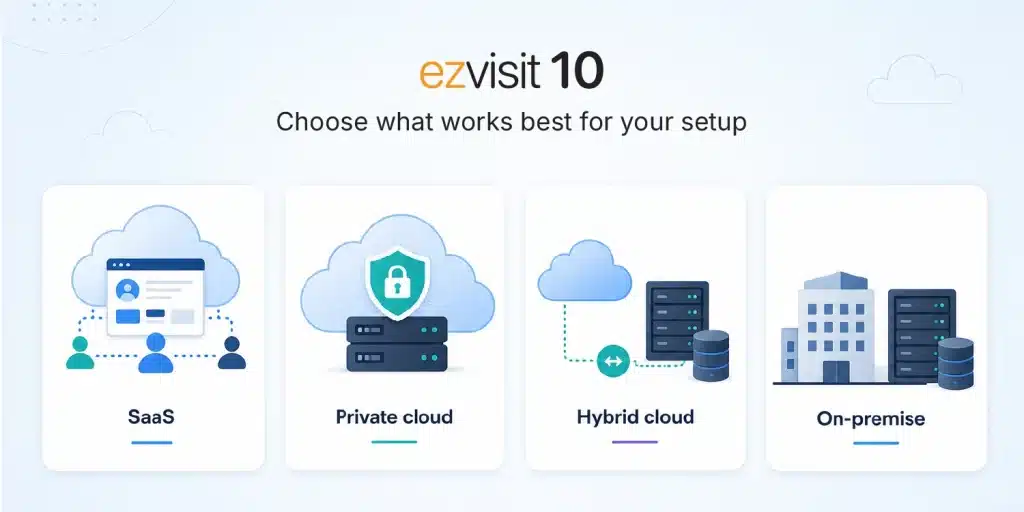
This is where deployment flexibility becomes a serious buying criterion. Some vendors are built around one model.
IDCUBE’s ezvisit10 is positioned as infrastructure-agnostic, supporting SaaS, private cloud, and on-premise deployment.
For IT and security stakeholders, that flexibility can reduce friction during procurement because the visitor platform can fit the enterprise architecture rather than forcing the architecture to fit the platform.
Must-have features of visitor management software
The best software for visitor management does more than replace a reception register. It controls the full visitor journey.
What cloud-based visitor management software should automate and support
| Feature | Why it matters for enterprises |
| Pre-registration | Gives security and reception teams advance visibility and reduces entry delays. |
| Approval workflows | Routes visitor requests through hosts, security, admin, or other stakeholders based on site policy and risk. |
| QR-based digital visitor pass | Supports contactless visitor entry and reduces dependence on printed badges. |
| Self-check-in kiosk or app | Reduces front-desk workload at busy lobbies, campuses, and reception areas. |
| Walk-in handling | Captures unscheduled visitors through defined workflows without bypassing policy. |
| Access control integration | Connects visitor approval with physical entry rules and access permissions. |
| Calendar integration | Aligns visits with Microsoft 365/Office 365 and Google Workspace/G-Suite meeting workflows. |
| Visitor workstation integration | Supports webcams, scanners, and printers where assisted reception or guard-verified check-in is needed. |
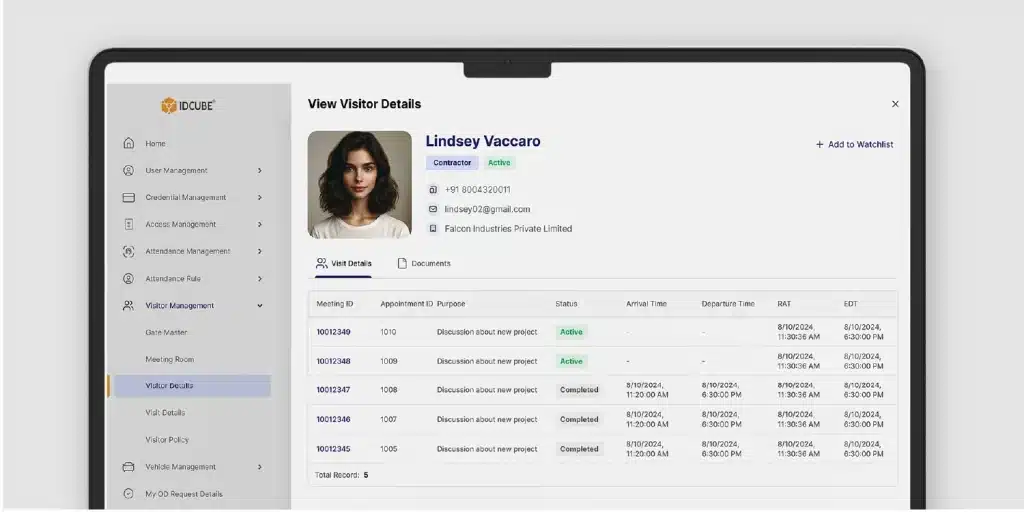
| Real-time dashboard | Helps teams track visitor activity, approvals, visitor volume, delays, and entry patterns. |
| Bulk or group invitations | Speeds up event, interview, training, and large group visitor processing. |
| Digital visitor records and reports | Supports audits, investigations, compliance reviews, and internal governance. |
| Deployment flexibility | Supports SaaS, private cloud, or on-premise alignment with IT and security policy. |
For enterprises, the real test is whether the system can separate one visitor journey from another.
A candidate coming for an interview, a vendor carrying equipment, and an auditor entering a restricted area should not all follow the same check-in path.
That is why workflow-based visitor management works better than a single standard process. It allows the visit to be handled according to its purpose, risk, and security requirement.
Why are enterprises moving visitor management to the cloud?

The move to cloud-based visitor management is driven by three pressures: security risk, operational scale, and audit expectations.
Security risk is the clearest.
Visitor data is identity data. It may include names, contact details, visit purpose, host relationships, documents, pass records, and access events
Cyber and physical security are also converging. Visitor management sits at the edge of that risk environment because it connects people, devices, credentials, apps, and physical entry.
Operational scale brings the next challenge.
When an organization runs several offices, every reception desk cannot follow its own version of the process. Central security teams need common rules, consistent reports, and enough flexibility for each site to manage local exceptions.
A cloud-based visitor management system creates that common process without making every location operate in the same way.
Compliance adds another layer.
Paper visitor logs are difficult to search, easy to misread, and not very reliable for retention control. Digital records, when managed properly, can support audits, investigations, emergency reviews, and data privacy processes.
This is where certifications and security posture become part of the buying decision. IDCUBE lists SOC 2 Type II, ISO 9001, ISO 27001, ISO 27018, ISO 45001, GDPR alignment, and VAPT testing among its certifications and compliance signals for ezvisit10.
Industry use cases for cloud-based visitor management
Different industries need different visitor journeys.
That is why configurable workflows matter.
Enterprise offices and headquarters need a smooth process for clients, candidates, vendors, auditors, and employees from other locations. Calendar integration, host notifications, QR passes, and self-check-in kiosks are often high-value here.
Data centers and critical infrastructure need stricter approval, identity verification, guard validation, zone-based access, and audit trails. A digital visitor log is not enough. The system must support controlled access and reviewable movement records.
Healthcare facilities need to balance patient, vendor, contractor, and administrative visitors. Visitor tracking can support safety policies, restricted-area control, and faster review during incidents.
BFSI and regulated workplaces need stronger governance around non-employee access. Audit-ready records, retention policies, approval trails, and cybersecurity posture matter during vendor evaluation.
Hospitality and business parks need faster movement without compromising control. QR-based entry, group invitations, and self-service check-in can reduce congestion during peak arrival times.
Co-working and multi-tenant buildings need a flexible model because tenants, hosts, guests, couriers, service teams, and walk-ins may all share the same entry infrastructure. A cloud platform helps property and security teams maintain central visibility while supporting tenant-specific workflows.
IDCUBE’s broader access ecosystem is relevant here because visitor management rarely lives alone.
ezvisit10 can inter-connect with Access Master for access control and GreenID for unified mobile access, allowing visitor entry to sit inside a wider identity and physical access model.
Best cloud-based visitor management solutions

The best visitor management systems tend to fall into four groups.
- Workplace experience platforms are strong when visitor management is part of a broader office experience program. They often pair visitor check-in with room booking, desk booking, deliveries, and hybrid workplace tools.
- Reception and front-desk platforms are useful for small and mid-sized offices that need digital sign-in, badges, notifications, and basic visitor logs without complex access-control integration.
- Security ecosystem platforms fit organizations that want visitor management tied to access control, video, alarms, credentials, and site operations. These are usually more relevant for enterprises, regulated facilities, and high-security environments.
- Industrial and contractor-heavy platforms focus on complex visitor types, safety workflows, contractor access, site induction, and operational compliance.
IDCUBE ezvisit10 sits closest to the security ecosystem category, with an important distinction – it is designed as part of a connected access and identity platform, not merely a visitor kiosk.
The strength of ezvisit10 is in how much of the visitor journey it already covers. It brings together 10 predefined workflows, QR-based passes through email, SMS, or GreenID, deployment options across SaaS, private cloud, and on-premise environments, Office 365 and G-Suite integration, access-control connectivity, visitor workstation hardware support, group invitations, self-check-in, and an AI-powered dashboard for real-time tracking and analytics.
The right shortlist will still depend on the buyer’s environment.
A small creative office may care most about a branded sign-in experience.
A multi-site enterprise should look more closely at workflow depth, access integration, cybersecurity posture, deployment fit, and audit readiness.
Practical buyer’s checklist
Use these questions before selecting a cloud-based visitor management solution:
- Can the system support host-initiated, visitor-initiated, and direct walk-in journeys?
- Can workflows change by visitor type, site, risk level, or approval requirement?
- Does the system issue QR-based or mobile visitor passes with controlled validity?
- Can it integrate with the access control system already deployed at the facility?
- Does it support Office 365 or G-Suite calendar workflows?
- Can reception and security teams use kiosks, apps, guard consoles, scanners, webcams, or printers where needed?
- Is multi-site administration centralized, and can local teams still manage local exceptions?
- Does the vendor offer SaaS, private cloud, hybrid, or on-premise deployment options?
- What certifications, security testing, privacy controls, and audit logs can the vendor show?
- Can the dashboard show real-time visitors, pending approvals, visitor history, and trend insights?
- How are visitor records retained, exported, deleted, and protected?
- Can the system handle group invitations for events, training, interviews, and bulk visits?
For procurement teams, these questions prevent a common mismatch: buying a simple digital sign-in tool when the organization actually needs visitor access governance.
Where IDCUBE ezvisit10 fits in?
IDCUBE ezvisit10 fits organizations that do not want visitor management to remain a separate reception activity. It is better suited for teams that want the visitor process to connect with physical access control, identity rules, and the way the site actually operates.
The platform comes with 10 predefined workflows across Host-Initiated, Visitor-Initiated, and Direct Walk-In journeys. It supports QR-based visitor passes through email, SMS, or the GreenID app. Teams can also use kiosk or app-based self-check-in, group and bulk invitations, Office 365 and G-Suite calendar integration, visitor workstation hardware, and dashboards for real-time visitor tracking and analytics.
Its deployment flexibility is a meaningful differentiator.
ezvisit10 supports SaaS, private cloud, and on-premise models, which gives IT and security leaders more room to align with data policy, infrastructure strategy, and regulatory expectations.
In short: ezvisit10 is not positioned as another reception screen. It is visitor management as part of a connected access platform.
Frequently asked questions
What is a cloud visitor management system?
A cloud visitor management system is web-based software for registering, approving, identifying, tracking, and reporting on visitors. It helps organizations replace manual logs with digital workflows, issue visitor credentials such as QR passes, manage approvals, and review visitor activity across one or multiple locations.
What is the purpose of visitor management system software?
A visitor management system helps confirm who the visitor is, why they are entering, who approved the visit, where they can go, and what record remains after check-out. It improves security, visitor experience, and audit readiness.
What features should visitor management software include?
Enterprise visitor management software should include pre-registration, approval workflows, QR-based visitor passes, self-check-in, walk-in handling, access control integration, calendar integration, visitor records, dashboards, reporting, and deployment flexibility. High-security sites should also evaluate guard verification and workstation hardware support.
Is cloud visitor management better than on-premise visitor management?
Cloud is usually better for multi-site visibility, faster rollout, remote administration, and easier updates. On-premise may still be preferred for strict infrastructure, regulatory, or connectivity requirements. Many enterprises benefit from vendors that support SaaS, private cloud, and on-premise deployment rather than only one model.
How does visitor management connect with access control?
When visitor management integrates with access control, an approved visitor pass can be tied to physical entry rules. This helps limit access to approved areas, logs visitor entry events, and reduces the risk of a visitor being recorded at reception but unmanaged after check-in.
What makes IDCUBE ezvisit10 different?
ezvisit10 combines 10 predefined visitor workflows, QR-based passes, self-check-in, group invitations, Office 365 and G-Suite integration, access control connectivity, flexible deployment, and an AI-powered visitor dashboard. It is built for enterprises that need visitor management connected with broader access and identity operations.
The real value of cloud visitor management
A cloud visitor management system should do more than digitize reception. It should provide a connected, centrally managed framework for controlling visitor identity, approvals, access permissions, records, and visibility across every location.
While a basic sign-in application may be sufficient for smaller offices, enterprises require far greater depth. They need configurable workflows, seamless access control integration, multi-site oversight, strong cybersecurity and compliance capabilities, and deployment flexibility across SaaS, private cloud, and on-premise environments.
IDCUBE ezvisit10 is built to meet these enterprise demands, transforming visitor management from a standalone front-desk process into a connected part of the organization’s broader access and identity ecosystem.