












Hospital Visitor Management for Balancing Visitor Access, Privacy, and Patient Safety
Table of contents
- Why Different Hospital Visitors Need Different Access Controls?
- How Hospital Visitor Management Integrates with Access Control Systems?
- Protecting Patient Privacy Throughout the Hospital Visitor Process
- How IDCUBE ezvisit10 Simplifies Hospital Visitor Management and Access Control?
- What Should Hospitals Consider When Selecting a Solution?
- Conclusion
A hospital must remain accessible to patients and legitimate visitors while maintaining controlled access to sensitive areas.
Family members may need access to OPDs, waiting areas, or permitted patient wards, while access to ICUs, laboratories, pharmacies, medical supply stores, technical rooms, and medical-waste areas may require stricter authorization. Vendors, service engineers, and contractors may also need access to specific operational zones for a limited period.
In some hospitals, access can extend to designated elevators for visitors, patient movement, staff, or service operations, making zone- and role-based physical access control essential.
This makes hospital visitor management an important part of hospital access control. It is not limited to recording who enters the facility. It should help establish who the visitor is, why access is required, who approved the visit, where the visitor can go, and how long that access should remain valid.
Why Different Hospital Visitors Need Different Access Controls?
Hospitals typically include public spaces, patient-care areas, laboratories, pharmacies, administrative departments, technical rooms, and other controlled zones.

The access requirements for each area can be different.
The same is true for visitors.
| Visitor type | Hospital zone | Access requirement |
| Patient family and friends | Ward / visiting area | Access during approved visiting hours |
| Attendant | Ward/ assigned floor or wing | Multi-day access for the patient’s stay, restricted to the assigned ward, floor, or wing and other permitted areas. |
| Visiting doctor / external clinician | Clinical / consultation area | Temporary access to approved areas |
| Service engineer | Equipment / technical area | Time-bound access to the service location |
| Vendor / Contractor | Maintenance / work area | Access after verification and approval |
| Auditor / consultant | Administrative area | Temporary access to approved departments |
| Delivery personnel | Receiving / loading area | Limited access to the handover point |
| Walk-in visitor | Reception to approved area | Register, verify, obtain approval, then enter the permitted area |
A hospital visitor management system should therefore support visitor-specific workflows rather than applying one standard process to every visit.
How Hospital Visitor Management Integrates with Access Control Systems?
Approving a visitor at reception is only one part of the process. The next step is to ensure that the approved visitor receives only the physical access required for the visit.
When visitor management is integrated with physical access control, access permissions can be configured in accordance with the hospital’s security policies.
Depending on the system and site configuration, this may include:
- Permitted door or entry point
- Authorized floor or zone
- Access start and expiry time
- Visitor category and purpose
- Additional verification requirements
Example – For visitors meeting an admitted patient, the visitor record should be mapped to the patient’s name and patient ID before access is approved. The visitor may then receive time-limited access to the relevant ward or visiting area during permitted hours. A service engineer, by comparison, may receive access only to the approved technical area for the defined maintenance period.
This enables hospital visitor management to provide controlled access without making the process difficult for visitors.
For patient visitors, an operator-assisted workflow may be more practical, where reception staff can capture the patient’s name, patient ID, visitor details, and relationship, then create the pass or issue a temporary access card as required.
Vendors and maintenance personnel, however, can follow pre-registration workflows and should be mapped to the relevant hospital employee or department responsible for the visit. Their credentials can then be restricted to the approved area and time window.
Protecting Patient Privacy Throughout the Hospital Visitor Process
Visitor management in hospitals also involves handling personal information.
The facility needs sufficient information to identify and authorize a visitor, while ensuring that this information is accessible only to authorized personnel. Similarly, a visitor pass or reception interface should not display unnecessary patient or visitor information.
A well-designed healthcare visitor management system should support controlled access to visitor PII, defined administrative permissions, and traceable visitor records.
Healthcare organizations should therefore consider what information is collected, who can access it, how it is used during the visit, and how long it needs to be retained according to applicable policies and regulations.
In this way, visitor privacy and hospital physical security operate as part of the same access governance process.
How IDCUBE ezvisit10 Simplifies Hospital Visitor Management and Access Control?
IDCUBE ezvisit10 supports 10 visitor journeys organized across host-initiated, visitor-initiated, and direct walk-in visits. These workflows can use Express or Secure Mode with e-gate or security-guard-assisted entry, enabling organizations to select the appropriate process based on the visitor and facility requirements.
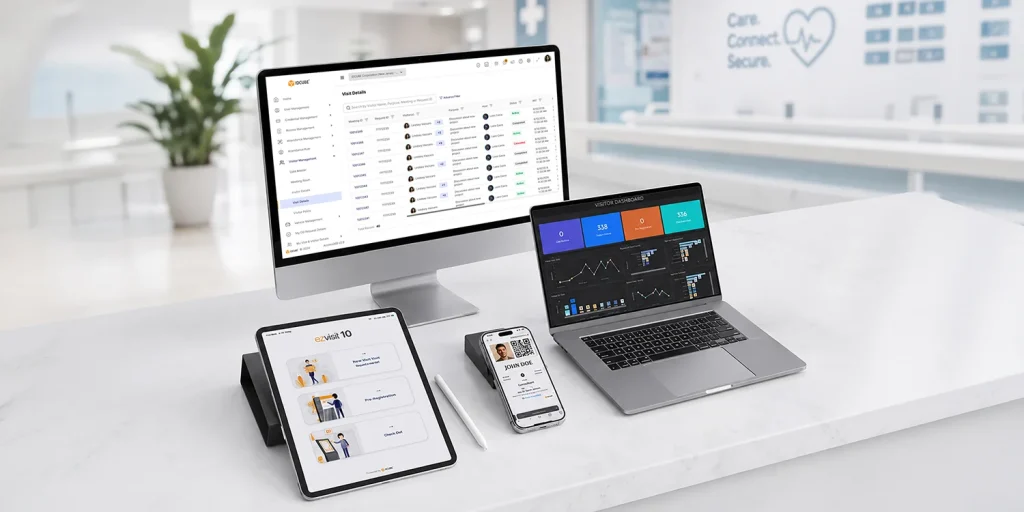
For a healthcare environment, this means a scheduled vendor, contractor, walk-in visitor, or other approved guest does not need to follow the same access process.
ezvisit10 integrates visitor workflows with Access360 physical access control or compatible third-party access control systems, subject to supported integration and site configuration. Depending on the deployment, visitors can use QR-based e-passes, PINs, temporary access cards, printed passes, or supported mobile credentials.
The solution also supports visitor and host portals, GreenID Mobile App, self-service kiosks, lobby workstations, group invitations, visitor dashboards, and reporting.
For hospital groups and multi-site healthcare organizations, ezvisit10 can operate through SaaS, private-cloud, or on-premises environments based on the selected Access360 architecture and organizational requirements.
What Should Hospitals Consider When Selecting a Solution?
When evaluating visitor management solutions for hospitals facility visitor management systems, organizations should look beyond digital registration.
The first step should be to identify and categorize every visitor type that may enter the facility, then define the most suitable workflow, approval process, access level, and required data fields for each category in line with the hospital’s security policy.
This helps ensure that patient visitors, attendants, vendors, contractors, service personnel, and other visitor groups are handled through workflows designed for their specific access requirements.
A suitable solution should support:
- Different workflows for different visitor types
- Integration with physical access control
- Time- and area-restricted visitor credentials
- Pre-registration and walk-in processing
- Assisted and self-service check-in
- Protection of visitor information
- Traceable approval and access records
- Multi-site administration and suitable deployment options
The right visitor management software for hospitals should align with the hospital’s access policies while remaining practical for visitors, reception teams, security personnel, and facility administrators.
Conclusion
Effective healthcare visitor management requires more than knowing who entered the hospital. It requires linking visitor identity and approval with controlled physical access.
IDCUBE ezvisit10 supports this approach through configurable visitor workflows, assisted and self-service operations, visitor records, and integration with physical access control. It also supports easy-to-use virtual credentials, including mobile credentials, Bluetooth-based access, and dynamic or static QR codes, depending on the deployment and site configuration.
For healthcare facilities, this creates a structured way to manage visitor access while maintaining privacy, patient safety, and appropriate control over sensitive areas.