













AI access control: What AI and automated access control systems can actually do
- What is AI access control?
- AI vs automated access control: What’s the difference?
- How does AI-powered access control work?
- What can AI actually do in access control today?
- Can AI detect unauthorized access?
- How to get the best results from AI access control
- AI access control in practice: IDCUBE AInsights
- The real value of AI in access control
- Frequently asked questions about AI access control
- Does AI access control require replacing existing controllers and readers?
- What happens if the network or AI analytics platform goes offline?
- How much historical information does AI need to recognize unusual access behavior?
- Can AI automatically change employee access permissions?
- Can AI access control work in cloud and on-premises environments?
- Is AI access control the same as identity and access management (IAM)?
A badge scan on its own doesn’t say much. Neither does a single forced-door alarm or a denied entry at the loading bay, and a credential left active three months after its owner resigned sits unnoticed in the cardholder database until somebody actually uses it.
The trouble is scale. Take a site with 2,000 badge holders who each generate around eight events a day. It comes to roughly 16,000 records every 24 hours, and no control room, however well-staffed, reads them line by line.
So the risk isn’t really the amount of data. It’s that the handful of events that should worry you sit inside that pile looking exactly like everything else.
AI access control helps security teams make sense of this information. Rather than piecing events together from the logs after an incident, operators get a chance to see unusual activity while there’s still time to act on it.
There’s an important distinction, though. Many everyday access control functions are automated without using artificial intelligence. Understanding where automation ends and AI begins helps organizations make informed technology decisions.
What is AI access control?
AI access control is the use of artificial intelligence on the data a physical access control system (PACS) already produces: credential activity, granted and denied entries, door alarms and the event records flowing in from each of your facilities.
The techniques such as machine learning, behavioral analytics, and anomaly detection can identify patterns that a standard report was never designed to surface.
An example makes this clearer. An employee normally badges in between 8 a.m. and 10 a.m., yet one evening their credential is used at a different facility, well after their shift would have ended.
There may be a perfectly good reason for it, and the person may well have permission to be there. It’s still a break from their usual pattern, which is enough to justify someone taking a look.
AI analysis brings that one event to an operator’s attention, so nobody has to go hunting for it among thousands of records.
AI turns up in several other parts of physical security:
- Behavioral analytics: Flags access activity that doesn’t match a person’s established pattern.
- Biometric recognition: AI-assisted face or fingerprint matching that confirms identity, either as the credential itself or as a second factor alongside a card.
- Video-assisted detection: Helps detect possible tailgating where compatible cameras are installed.
- Security investigations: Links related events into a single timeline so operators can work out what happened.
- Natural-language queries: Lets authorized users ask questions in ordinary language instead of building a report.
Which of these you can use will depend on the hardware, software, data sources, and integrations at each site.
We cover these applications in more depth in our article on AI in building security.
AI vs automated access control: What’s the difference?
An automated access control system carries out tasks according to established policies. AI has a different role: it examines information to identify patterns, relationships, and potential risks.
Employee offboarding shows the difference well. When HR updates an employee’s status, an integrated access control system can revoke the person’s credentials automatically. The system isn’t learning or interpreting behavior. It’s following a predefined workflow.
Compare that with a contractor whose credentials are still valid but who, over a couple of weeks, starts appearing at a warehouse they’ve never visited before. No rule covers that situation. An AI model can notice the change in behavior and recommend that someone look into it.
| Aspect | Automated access control | AI access control |
| How it works | Follows the policies and workflows you’ve defined | Uses AI models to read the data and find patterns |
| Typical example | Shuts off a departing employee’s access the day HR processes the exit | Flags an odd after-hours entry nobody planned for |
| Output | Access decisions, alerts, automated actions | Anomaly scores, risk flags, insights |
| Best suited for | Routine, predictable jobs | The things fixed rules tend to miss |
| Human involvement | Runs on its own; people step in only where approval rules say so | A person reviews what’s flagged, or a tightly controlled workflow takes over |
Traditional systems already handle credential management, schedules, and access reports, and AI doesn’t replace any of that. It adds a layer of analysis on top, which helps teams catch the issues that are less obvious.
It’s also important not to confuse AI with conventional analytics. Counting access events, identifying expired credentials, and producing reports don’t necessarily require machine learning.
IDCUBE’s rule-based access control article explains how predefined conditions are used to govern physical access decisions.
How does AI-powered access control work?
Suppose an employee enters a sensitive area at 2 a.m. with a valid credential. The controller checks their permissions, finds that the request meets the configured rules, and unlocks the door, which from the controller’s point of view is the correct decision.

What the controller doesn’t know is that this person has never been in that area at that hour before. An AI analytics platform can compare the entry with their previous activity, their work schedule, the usual patterns of colleagues in similar roles, and any other context it has, and if the event looks out of character, flag it with an explanation so an operator can confirm whether the visit was authorized.
Most platforms follow a process with five stages:
- Collect: Access events, alarms, credential data, and other relevant records are gathered from connected systems.
- Validate: Timestamps are checked, duplicates removed, and each credential matched to the right identity.
- Analyze: Configured rules and suitable AI models are applied to examine behavior and detect potential risks.
- Prioritize: Findings that matter become contextual alerts, risk scores, or investigation queues.
- Review: Security staff examine what has been flagged, and confirmed findings are fed back to improve detection.
All of this depends heavily on the quality of the data coming in. If a controller’s clock has drifted by 40 minutes, a routine entry can look suspicious, and missing exit records can produce movement patterns that never happened. Reliable integrations and accurate event records therefore must come first, before anyone starts talking about models.
What can AI actually do in access control today?
The practical value of AI becomes clearer when examined through everyday security operations.

1. Detect unusual access behavior
Most people settle into routines. They use the same entrances, keep similar hours, and move between a fairly predictable set of locations from one week to the next.
Behavioral analytics looks for activity that falls outside those routines.
If a member of the finance team starts using their badge at the IT storeroom, for instance, the system can flag it. An operator then checks whether there’s a legitimate explanation, such as overtime or a maintenance job.
AI identifies the unusual event; the security team decides whether it’s a problem.
2. Identify vulnerabilities and access exceptions
Some weaknesses stay hidden for months simply because nothing dramatic happens to expose them.
A contractor whose project ended in March may still have a working badge. Someone who moved departments last year may still have access to rooms they no longer need. Conventional checks, such as periodic access reviews and credential expiry reports, find many of these conditions. AI can add value by connecting separate findings and moving the riskier combinations higher up the list.
A dormant account with broad access privileges, for example, calls for more urgency than an expired visitor pass.
That way, the team’s limited time goes to the risks that matter most.
Related reading: How enterprise risk assessment software solves key challenges.
3. Improve alarm management and investigations
Repeated alarms are part of daily life at any busy facility.
A single faulty door closer can trigger dozens of door-held-open alerts in a day, and after a while operators start to tune them out, which is exactly when a more important alarm can be missed.
Standard reporting already shows which alarms recur at which doors, and how quickly they were answered. AI-assisted analysis can go further by examining event sequences and relationships that a report won’t make obvious. This extra context helps operators decide which incidents need attention straight away and which can wait.
However, an unusual alarm pattern doesn’t establish what happened. Video footage or other evidence may still be necessary.
4. Analyze occupancy and facility usage
Access records can offer useful information about how buildings operate.
Entry and exit data can show peak periods, movement trends, and areas that see very little traffic. Facility managers can use that when reviewing staffing levels, cleaning schedules, or space requirements. A floor that stays half empty all week, for example, may be worth discussing with whoever manages the space.
These figures should be read with some care, since tailgating, missing exit events, and gaps in reader coverage all affect occupancy estimates.
5. Monitor credentials, visitors, and infrastructure
Not every access control problem starts as a security incident. Many start as maintenance issues.
A reader might lose communication with its controller every few days before it fails completely, or a visitor pass might stay active long after the visitor has left. Automated checks, reports, and device monitoring will pick up most of these conditions. With enough historical equipment data, predictive analytics can also learn the patterns that tend to come before a failure.
Routine credential checks and device-health monitoring don’t require AI. The AI contribution here is prediction: identifying the reader that’s likely to fail before it locks anyone out.
6. Retrieve security information through natural language
Security managers sometimes need one quick answer from a large and complicated set of records.
They may want to know, for example, who entered the building after hours the previous day.
Instead of running several reports, an authorized user could simply ask: “Who accessed the facility after 7 p.m. yesterday?”
A generative AI assistant, can retrieve that information from supported systems, while still respecting the user’s permissions and the security controls that have been configured.
Can AI detect unauthorized access?
AI can help identify suspicious access activity, but different kinds of incidents call for different detection methods. A revoked credential is rejected by ordinary access control rules, and repeated denied attempts can trigger standard alerts. Neither involves AI.
AI is most useful where access is technically authorized, but the activity itself looks unusual.
Tailgating is a separate challenge. It occurs when someone follows an authorized person into a secured area without presenting a credential of their own. If the authorized person knowingly lets them in, it’s usually called piggybacking.
Since the second person never scans a badge, the access control system may have no record of their entry.
Compatible video analytics or entrance sensors can detect these movements and alert security staff.
Configured anti-passback controls also help. They don’t catch the tailgater at the door, but because they enforce the entry and exit sequence, with hard anti-passback enabled, a person who tailgated in will be refused the next time they use their own badge.
How to get the best results from AI access control
Introducing AI is only one part of improving security operations. The value you get depends on the quality of your data and on how your team responds to what it finds.
The five practices below make the biggest difference:
- Verify unusual activity: Check what actually happened before acting on an alert that affects someone’s job or access.
- Maintain reliable records: Keep controller clocks synced to a common time source, identity data current, and gaps in event logs fixed.
- Evaluate alert quality: Track how many alerts turn out to be useful, how many are false positives, and how long each one takes to investigate.
- Define operational responsibilities: Let routine workflows run automatically, but keep approvals and audit trails for anything sensitive.
- Protect security information: Access data is sensitive in its own right, so protect it with access controls, encryption, sensible retention policies and privacy safeguards.
Together, these help organizations get real value from analytics while keeping people in control of the decisions that matter.
AI access control in practice: IDCUBE AInsights
Access control systems produce large volumes of useful information. The challenge grows when an organization operates several facilities, each with different devices, users, and security requirements.
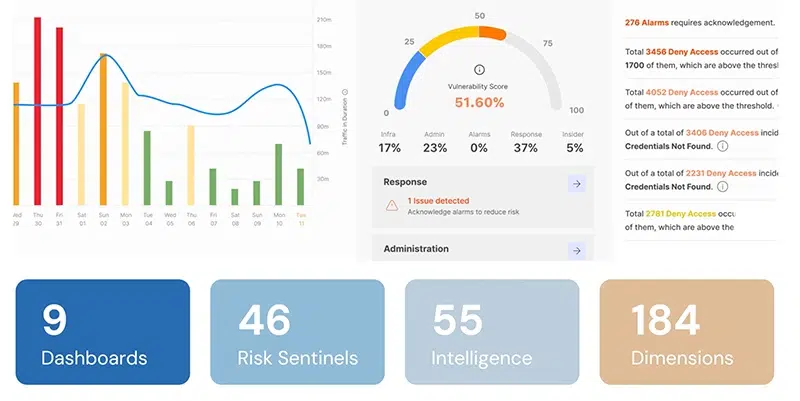
IDCUBE’s AInsights brings access control analytics and AI-driven security intelligence together on one central platform. AInsights consolidates data from multiple access control systems into a single data lake, so security teams can review vulnerabilities, alarm patterns, operational trends, and risk indicators in one place rather than across disconnected reports.
AInsights includes nine analytical dashboards, 55 intelligence modules, 184 analytical dimensions, and 46 risk sentinels.
Together, these cover several areas of enterprise security:
- Behavioral risk analysis: Compares each person’s access activity with their own history and with peer patterns to flag anomalies and early signs of insider risk.
- Vulnerability assessment: 46 risk sentinels, dedicated to vulnerability and threat analysis, check for weak spots in administration, infrastructure, events, and incident response.
- Facility security scoring: Rates each facility’s security performance on 46 parameters covering infrastructure, policies, administration, alarms, and incident response, so security directors can see which sites need attention first.
- Alarm intelligence: Alarm Vision supports analysis of recurring alarms, affected access points, and response patterns, tracking more than 50 parameters across eight modules.
- Occupancy intelligence: Shows how people move around a site, along with current headcount.
- Operational monitoring: Separate dashboards handle visitors, attendance, credentials, people, and system health.
For a security director responsible for several sites, the result is a consistent view of security conditions across all of them, rather than a patchwork of local reports.
AInsights combines AI-based analysis with conventional reporting and automated checks. Individual functions depend on the available data and configured capabilities.
IDCUBE also offers AIsha, a GenAI assistant that supports natural-language interaction with access control information.
IDCUBE maintains a strong focus on security, data protection, and compliance, supported by SOC 2 Type 2, VAPT, GDPR, ISO 9001, ISO 27001, ISO 27018, and ISO 45001.
The real value of AI in access control
Traditional access control enforces entry permissions, automation carries out predefined workflows, and AI analyzes the information both of them generate.
The distinction matters because each one solves a different problem. A conventional system can record that someone entered a secured area. AI can help explain why that entry deserves a closer look. For most organizations, the opportunity lies in making better use of the security data they already collect.
Start with reliable data, choose applications that matter, and validate the results before expanding the deployment.
Explore IDCUBE AInsights to see how AI-driven security intelligence can support your enterprise access control operations.
Frequently asked questions about AI access control
Does AI access control require replacing existing controllers and readers?
No, in most cases it doesn’t. AI analytics works on the event data your current access control system already records, as long as that data can be exported or integrated. IDCUBE AInsights, for example, consolidates data from multiple access control systems into a single data lake before analyzing it. New hardware is only needed for capabilities that rely on new data sources, such as biometric readers or cameras for video-assisted tailgating detection.
What happens if the network or AI analytics platform goes offline?
Doors keep working. Access controllers that make decisions locally continue to enforce the permissions stored on them, and many also buffer events while offline and upload them once the connection returns. Only the centralized analytics pauses, and it catches up when the buffered events sync. Offline behavior depends on the controller’s configuration, so check its offline decision-making and event-buffer capacity during evaluation.
How much historical information does AI need to recognize unusual access behavior?
There’s no fixed minimum. Rule-based checks work from day one, while behavioral models need enough representative history to learn what normal looks like for each person and peer group. How much that is depends on event volume, how regular working schedules are, and what you want to detect. Sites with rotating shifts or seasonal patterns usually need a longer baseline.
Can AI automatically change employee access permissions?
It can, but it shouldn’t do so unchecked. AI-generated findings can trigger automated workflows, such as suspending a dormant credential, when the access control platform supports it. Changes to sensitive permissions should still go through defined authorization, approval, and rollback steps, with a full audit trail, so a false positive can’t lock the night shift out of a plant at 3 a.m.
Can AI access control work in cloud and on-premises environments?
Yes, depending on the product. AI analytics can run in a public cloud, on-premises or in a private cloud. IDCUBE’s access control platform, Access360 Core, is available in two deployment models, Access360 Core SaaS and Access360 Core Self-hosted, so organizations can choose based on their IT policies and data-residency requirements. Whichever model you pick, check connectivity requirements and data-governance obligations first.
Is AI access control the same as identity and access management (IAM)?
No. Identity and access management (IAM) controls digital identities and permissions for applications, systems and data, while physical access control governs entry to buildings, rooms and other secured areas. The two increasingly overlap. Integrating them, often through physical identity and access management (PIAM), keeps a single identity record across both, so when someone leaves, their network account and their badge can be revoked together.