











Visitor Management System Guide: Features, Benefits, Costs, and Best Practices
Table of contents
- What Is a Visitor Management System?
- Why Use a Visitor Management System?
- How a Visitor Management System Works?
- How Does a Digital Visitor Management System Work?
- How to Create a Visitor Management System for Your Facility?
- What to Look for in a Visitor Management System?
- How to Choose a Visitor Management System?
- What Is the Best Visitor Management System?
- How Much Does a Visitor Management System Cost?
- Where IDCUBE ezvisit10 Fits?
- FAQs
- Closing Takeaway
A visitor may usually be a customer, contractor, job candidate, auditor, vendor, delivery partner, tenant, consultant, or service engineer.
Each one may need a different registration process, approval path, credential, access rule, and record supervision. All based on the facility and visitor type.
That is why “visitor management system” is no longer just another phrase for a tablet at reception.
For global facilities, it now touches crucial aspects including workplace security, front-desk operations, privacy governance, emergency readiness, and physical access control.
A visitor management system is software that pre-registers, approves, identifies, tracks, and records visitors’ logs across a workplace or facility. A good system replaces paper logbooks with digital workflows, visitor passes, host notifications, access control integration, reporting, and searchable records that help security and facilities teams manage every visit with more confidence.
What Is a Visitor Management System?
We may define a visitor management system as a digital platform for managing visitors’ entry into a workplace, campus, building, industrial site, or secure facility. Throughout this process, the VMS (Visitor Management System) records visitor information, routes approvals, notifies hosts, issues visitor passes, supports check-in and check-out, and maintains visit records for review & supervision by Security Administrators to support various business objectives.
In a traditional manual process, visitor usually enters the facility, write their name in a register, wait for someone to call the host, and may or may not be checked out later. That model depends heavily on memory, front-desk discipline, and trust in handwritten information.

Whereas a digital visitor management system creates a more structured process.
It can capture the visitor’s purpose, pre-register the visitor, capture and schedule details of host, company, contact details, identity proof, appointment time, visitor type, arrival time, departure time, and access status. It can also trigger host notifications, approvals, QR passes, badge printing, kiosk check-in, or access control rules.
The key point to convey is that visitor management is not only about reception convenience. It is about controlling temporary identity and delivering a smooth end-to-end experience to a facility visit. It ensures why the visitor is there, who approved the visit, when permission starts and ends, and where the visitor can go.
Example:
A small office may be fine with a check-in kiosk and a message to the host.
That would not be enough for a data centre, factory, hospital, bank, school, government site, or large business park. Visitors may need to be approved before arrival, show identification at the gate, complete safety formalities, and receive access only to specific areas. Every step may also need to be recorded for future review.
Why Use a Visitor Management System?
Most organisations start looking for a visitor management system when paper registers, spreadsheets, reception calls, or basic sign-in tools are no longer enough.
The main reason is simple: better visibility.
- Security, facilities, administration teams, and employees need a clear view of who is due to arrive, who has checked in, who is still on-site, and which visits are waiting for approval.
The second reason is better risk control.
- Visitor records often contain personal information, from names and contact details to photographs, identity documents, vehicle numbers, visit purpose, host details, and entry history. Organisations need to be clear about what they collect, why they need it, who can access it, and how long it should be retained. Visitor data should be managed with the same care as any other sensitive business information.
The third reason is security.
- Visitor management cannot solve every cyber or physical risk, but it can reduce ambiguity around who is on-site, who is approved, and who has access to sensitive areas.
The fourth reason is faster day-to-day operations.
- When the process is well kept and organised, there is less manual work at reception. Hosts can register visitors in advance, arrival instructions can be shared beforehand, and approval status is visible without repeated calls or follow-ups. Security teams can then spend more time dealing with unusual cases instead of routine check-ins.
The fifth reason is accountability.
- When something needs to be reviewed later, teams should be able to trace what happened. That includes who approved the visit, when the visitor entered, whether a pass was issued, where relevant, and whether the visitor checked out. This becomes especially important during audits, evacuations, investigations, compliance checks, or disputes.
How a Visitor Management System Works?
Most of the visitor management systems follow a similar lifecycle.
The depth of each step depends on the facility’s risk level and the software’s workflow capability.
1. The visit is created.
The visit may begin when a host invites a guest, when a visitor requests access, or when someone arrives without a prior appointment. This distinction matters because a planned client meeting, a contractor visit, and an unplanned walk-in should not always follow the same path.
2. The visitor information is captured.
The system collects the information required for that particular visitor type.
A low-risk guest may require information such as name, company, host, and purpose. Whereas a contractor or high-security visitor may require ID proof, documents, vehicle details, acknowledgements, or extra approvals.
Note – In the context of ezvisit10 of IDCUBE, it could either be Express mode or Secure mode. Both are workflow categories of the product.
3. The request is approved or rejected.
Approval may come from the host, security, facility administration, tenant administrator, compliance team, or a combination of roles. In higher-risk environments, approval should happen before the visitor reaches the access point.
4. The visitor receives a pass or credential.
This may be a QR code, PIN, printed badge, access card, mobile pass, or another temporary credential. The credential should work only for the approved visitor, time window, site, and entry rule.
5. The visitor checks in.
The visitor check-in usually happens at a kiosk, reception desk, guard station, mobile link, gate, turnstile, or security console. In all the cases, the system updates the visitor’s status from expected to arrive and notifies the relevant host or team.
6. Access is validated.
Depending on the facility type and solution, if the visitor management system connects with access control, the visitor’s approval can be tied to entry permissions. This is the difference between logging a visitor and governing visitor access.
7. The visit is monitored and closed.
The visitor simply checks out manually, automatically, or through an access event. The system keeps a record for reporting, investigations, audits, analytics, and process improvement.
How Does a Digital Visitor Management System Work?
A digital (software-led) visitor management system works by turning a manual visitor journey event into an end-to-end controlled workflow. Instead of relying on a handwritten register, it connects data capture, approvals, communication, credentialing, access rules, and records.
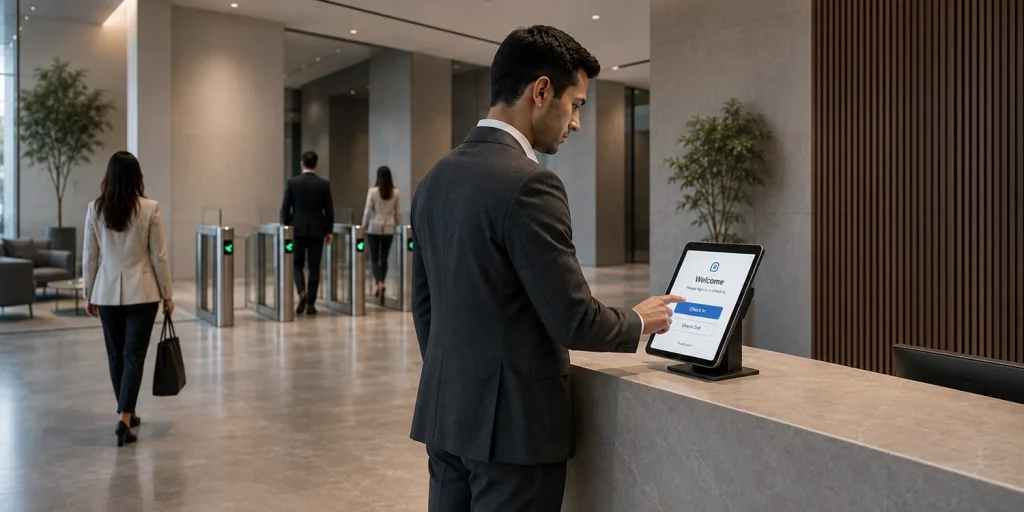
There are 5 digital layers to understand. Let’s simply for understanding:
- Intake captures the right information for each visitor type.
- Workflow logic decides whether the visit needs host approval, facility approval, document checks, safety acknowledgement, or guard verification.
- Communication sends the hosts and visitors right alerts and instructions.
- Credentialing issues a QR pass, badge, mobile credential, card, or PIN.
- Reporting shows visitor volume, repeat visitors, peak times, pending approvals, delays, and visit history.
How to Create a Visitor Management System for Your Facility?
“How to create a visitor management system?” does not usually mean building software from scratch. It means designing a visitor operating model and configuring software around it.
Here is a broad overview of how you can do this:
Start with visitor types.
- List every user (visitor) group that enters your site, considering the customers, vendors, contractors, auditors, delivery partners, tenants’ guests, interview candidates, inspectors, maintenance teams, and event attendees.
Next, map entry points.
- It varies as per facility type.
Example – A corporate office may have one reception desk. A campus may have gates, lobbies, docks, elevators, and restricted zones. The system should fit the actual physical path visitors take.
Then define approval rules.
- Decide which visitors can be host-approved, which need security approval, which require administration review, and which should be denied automatically.
After that, decide credential rules.
- Consider – Will the facility visitors use QR passes, badges, mobile passes, access cards, PINs, or guard-verified entry? Will the pass expire after one meeting, one day, one site, or one entry?
Set data rules early.
- Decide what information you collect, why you collect it, who can see it, how long you keep it, and how it is deleted or exported.
Pilot the workflow.
- Firstly, run the flow on one site, one reception, or one visitor category. Watch where delays happen; it could be on approvals, instructions, ID checks, badge printing, access permissions, or check-out. Fix the process before rolling it out globally.
Finally, document the operating model.
- A good visitor management system includes the people, approvals, devices, access rules, reports, and escalation paths around the software.
What to Look for in a Visitor Management System?
When the buyers ask what to look for in a visitor management system, the answer should go beyond a clean kiosk screen. The large organizations’ value comes from security control, flexibility, smooth visitor experience and appropriate fit as per the facility type.
Look for the configurable workflows that can handle planned visits, visitor-initiated requests, host-initiated requests, walk-ins, contractors, vendors, high-security visits, group invitations, and assisted reception flows, that too without treating every visitor the same.
Look for a strong host and approval handling. Hosts should be able to pre-register, invite visitors, approve requests, receive arrival alerts, and manage visit details. Security teams should also be able to review and override where policy requires it.
Check how visitors can complete the check-in process. A global organisation may use kiosks at one site, guard desks at another, and mobile links or reception workstations elsewhere. Controlled areas may also require an additional access check before entry.
Look for the visitor credentials that match site risk. Visitor passes should reflect the level of security at the site. A QR code may be enough for a regular office visit, while a restricted facility may need a badge, access card, PIN, or a guard to verify the visitor. In all cases, the pass should work only for the approved visit and expire when the visit is over.
Check whether visitor system connects with the access control. A visitor may be approved in advance, but that approval means little if the right door access is not activated when they arrive.
Look for privacy and data controls. Check role-based access, retention rules, export controls, audit logs, encryption, certifications, and vendor security posture.
Look for Reporting. It should answer practical questions, such as who is expected, who is currently inside. Which visits are still awaiting approval, where delays are occurring, and which visitor categories create the most demand.
Deployment flexibility also matters.
Example – The SaaS solutions may suit to the sites that need faster rollout and visibility across locations. Private cloud or on-premise deployment may be required where policy, data residency, connectivity, or regulatory requirements are stricter.
How to Choose a Visitor Management System?
In order to choose a visitor management system, we must start with the environment rather than the feature list.
If your facility is a corporate office, prioritize pre-registration, host notifications, calendar integration, self-check-in, visitor experience, and searchable records.
For data centres, manufacturing sites, critical infrastructure, government campuses, BFSI offices and other regulated facilities, security requirements are usually more demanding. Pay close attention to identity checks, approval routes, access control integration, pass validity, guard verification, audit records and the platform’s cybersecurity.
The needs are different in a business park, co-working space, apartment complex, or multi-tenant property. Here, the system should be able to handle different tenants, multiple visitor categories, gate-level processes, mobile passes, group visits, and site-specific requirements.
If your organisation operates across several countries or regions, look closely at how well the system can scale at each facility. It includes the crucial aspects, including language support, data governance, deployment choices, central reporting, and the freedom to configure each site locally, all matter.
It also helps to ask vendors a few practical questions:
- Can we set up different workflows for guests, vendors, contractors, auditors, interview candidates, event visitors, and walk-ins?
- Can an approved visit automatically trigger the right access permissions?
- Is the system flexible? Does the system work across kiosks, reception desks, guard stations, mobile passes, and QR-based entry?
- Can we control who sees visitor data and how long that data is retained?
- Is real-time monitoring possible? Can security teams view live visitor activity across all locations?
- What can the vendor provide in terms of certifications, penetration testing, audit controls, and privacy practices?
The right answer is the vendor whose workflow model matches your visitor risk, facility layout, and operating responsibilities.
What Is the Best Visitor Management System?
It could certainly be a system that matches your site’s visitor volume, risk profile, access control model, compliance needs, and operating style. A small design studio and a multi-site critical infrastructure operator should not buy from the same checklist.
For a normal office environment, a simple digital sign-in system may be enough. Tablet-based check-in, host notifications, visitor records, and badge printing can cover most day-to-day needs.
A global organization usually needs more. Different visitor workflows, rules for each visitor type, QR or mobile passes, access control and calendar integrations, central dashboards, security controls, and a choice of deployment models become far more important.
At a regulated or high-security facility, the system should provide a clear record of who approved the visit, which credential was issued, where the visitor was allowed to go, and how any exceptions were identified, handled & supervised.
How Much Does a Visitor Management System Cost?
When asking what a visitor management system costs, separate the budget into the following parts:
- Software subscription may be priced by location, kiosk, user, visitor volume, or module agreement.
- Hardware can include kiosks, webcams, scanners, badge printers, QR readers, access cards, controllers, or turnstile integrations. All depending on falicity type and business use case.
- Implementation may include workflow design, configuration, access control integration, calendar integration, training, and pilot support.
- Security and compliance work may include aspects such as vendor reviews, penetration testing evidence, role design, retention rules, audit logging, and legal review.
- Support, maintenance, and internal stakeholder time should also be budgeted.
Note – A useful budgeting question is not “What is the cheapest visitor management system?”
It is “What process are we trying to control, and what would a weak process cost us in delays, unauthorized access, failed audits, or unusable records?”
Where IDCUBE ezvisit10 Fits?
IDCUBE ezvisit10 is the best fit for those organizations that want visitor management to connect with their access control, mobile credentials, and real workflows rather than remain a standalone sign-in screen.
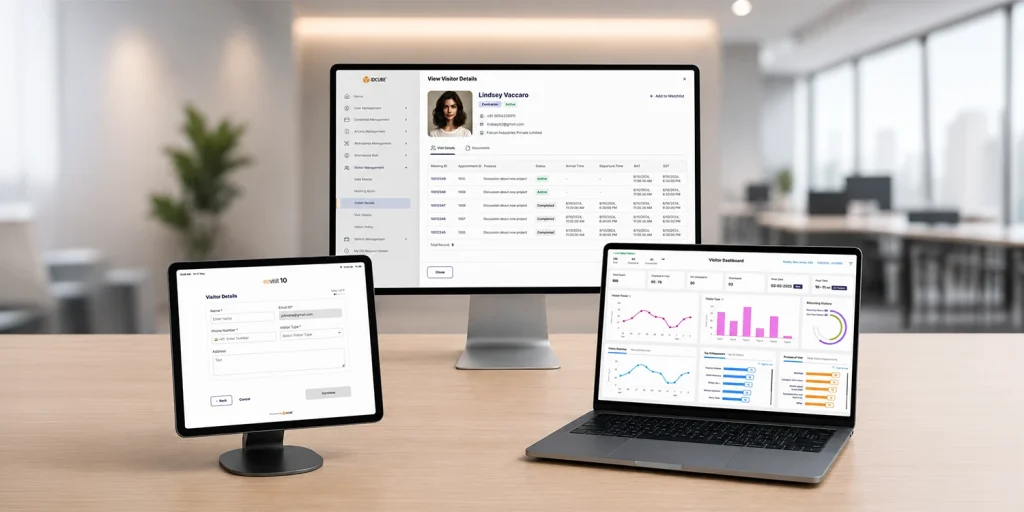
The platform is designed around 10 ready-to-use workflows across Host-Initiated, Visitor-Initiated, and Direct Walk-In categories. A scheduled customer, walk-in vendor, contractor, and critical-site visitor can each require a different process. IDCUBE lists self-check-in, pre-registered entry, assisted reception flows, real-time approvals, QR-based digital passes, dashboards, reports, and one interface for visitor operations.
For visitor credentials:
- ezvisit10 supports QR-based digital passes sent by email or SMS, and visitor passes can also work through the GreenID app. GreenID supports dynamic QR codes, NFC, BLE, Apple Wallet, Google Wallet, visitor invitation, e-passes, and arrival alerts.
For the physical security and PACS:
- ezvisit10 can connect with access control. IDCUBE’s Access Master supports rule-based and role-based access policies, occupancy management, mobile credentials, keycards, biometrics, PINs, dynamic QR codes, and access scenarios for different user groups.
For large organizations and suitability:
- ezvisit10 supports flexible deployment options including SaaS, private cloud, and on-premise. It also lists essential components such as Office 365 and G-Suite integration, group invitations, visitor workstation integration with webcams, scanners, and printers, and an AI-powered dashboard for the visitor tracking, analytics, and trend insights.
In the practical terms, IDCUBE ezvisit10 is right fit when it comes to visitor management that must align with access control, multi-site operations, mobile credentials, approval workflows, and audit-ready records of the organizational facility.
FAQs
Why should an organization use a digital visitor management system?
Organizations use a digital visitor management system to improve visibility, reduce manual reception work, standardize approvals, and maintain better visitor records. It is especially useful when sites handle vendors, contractors, interview candidates, auditors, delivery partners, tenant guests, or high visitor volumes that are difficult to manage with paper logs.
How does a visitor management system work at a facility?
A visitor management system captures visitor details, routes approvals, notifies hosts, issues a temporary pass, supports check-in and check-out, and stores the visit record. Depending on the facility setup, it may also connect with kiosks, badge printers, QR readers, calendar tools, or access control systems to support the approved visitor journey.
What features should a visitor management system include?
A strong visitor management system should include pre-registration, visitor-type workflows, host notifications, approval routing, digital visitor passes, self-check-in or assisted check-in, check-out records, reports, dashboards, data access controls, and deployment options. High-security or multi-site facilities should also evaluate hardware support and qualified integrations.
What does a visitor management system cost?
Cost depends on the software model, number of sites, visitor volume, hardware, integrations, deployment type, support needs, and security requirements. A simple sign-in setup usually costs less than an enterprise visitor management platform with kiosks, private deployment, workflow configuration, access integration, and compliance review requirements.
How can visitor management support audits and compliance reviews?
Visitor management can support audits by keeping structured records of visit requests, approvals, check-ins, check-outs, visitor credentials, and exceptions. It does not guarantee compliance by itself, but it gives security, facilities, and compliance teams better evidence than paper registers when reviewing incidents, access history, or data-retention practices.
Closing Takeaway
A visitor management system is tested on the ground, whether it helps your organization manage temporary identity with clarity i.e. the right visitor, the right approval, the right credential, the right access, and the right record.
For small sites, that may mean faster sign-in and better host notifications.
For global enterprises, it means a connected visitor access process that can scale across locations, visitor types, and risk levels.
IDCUBE ezvisit10 is built for that second requirement: visitor management as part of secure, connected facility access.