










What Is Access Control: A Comprehensive Guide
- Access control definition
- How Does Access Control Work?
- Key Components of Access Control Systems
- Access Control Models: RBAC and RuBAC
- Access Control Credentials and Authentication Methods
- Deployment Options: Cloud (Public and Private), On-Premises, and Hybrid
- Benefits of Access Control
- Access Control Best Practices
- Access Control and Regulatory Compliance
- How to Choose and Implement an Access Control System
- Top Physical Access Control Solution Providers
- Conclusion: Building a Smarter Access Strategy
- FAQs
One unauthorized entry can become a serious security incident.
For organizations managing multiple facilities and round-the-clock operations, access control is critical to protecting people and premises.
“According to IBM research, roughly 1 in 10 security breaches originates directly from a physical security compromise, often leading to heavy financial and reputational losses.”
With that in mind, ask yourself:
Do you have a secure access policy for your premises?
Will you instantly know if an unauthorized person tries to enter a restricted area?
If you can’t answer both questions in seconds, it’s time to rethink your access control.
This guide explains what physical access control is, how it works, and how to choose and implement the right solution for your organization.
Access control definition
Access control is the process of deciding who can enter which physical space, when, and under what conditions.
It governs entry to buildings, floors, rooms, parking areas, and other restricted zones. In simple terms, it makes sure the right person gets the right access at the right time.
A physical access control system (PACS) enforces those decisions at every access point, for both people and premises. It protects:
- People: employees, visitors, contractors, residents, students, and other occupants.
- Places: buildings, floors, offices, server rooms, labs, warehouses, etc.
- Physical assets: equipment, inventory, cash, documents, and other valuable resources.
Why it matters today
Your perimeter isn’t one front door anymore. Organizations run multiple facilities, shift-based teams, contractors, visitors, and delivery vendors, and every one of them creates an access decision.
A visitor may need access to the reception area but not the server room. Similarly, A technician may need access to the data center only during assigned time. Without the right controls, access gets granted too broadly, survives a role change, or stays active after someone leaves.
Risks of operating without physical access control
Many facilities still rely on mechanical keys, manual visitor registers, or a guard at the front desk. These methods work until something goes wrong, and then they offer little to help you prevent it, detect it, or investigate it.
- Keys can’t be controlled: Mechanical keys can be copied without your knowledge, and a single lost key can mean replacing locks across a floor or building.
- Leavers keep their access: Former employees and contractors may still hold keys or know door codes, and there’s no reliable way to confirm all copies have been returned.
- No record of who entered: Without logs, you can’t tell who accessed where, or when. Investigations rely on memory and guesswork.
- No real-time alerts: A forced door, a propped-open fire exit, or someone entering a restricted area after hours goes unnoticed until the damage is done.
- Unreliable visitor tracking: Paper registers are easy to fill with false names, hard to read, and rarely show whether a visitor actually left.
- No time-based restrictions: A key works the same at 3 AM as it does at 3 PM, so you can’t limit access by shift, schedule, or contract dates.
- Compliance gaps: Compliance frameworks such as SOC 2 and ISO 27001 expect you to restrict access to sensitive areas and prove it. Without access records, that proof is hard to produce.
- Blind spots in emergencies: During a fire or evacuation, there’s no accurate way to know who is still inside the building.
Electronic access control addresses each of these gaps by letting you issue and revoke credentials in seconds, restrict access by time and zone, and log every entry automatically.
How Does Access Control Work?
Every entry decision follows five steps. We call the core of it IAAA: identification, authentication, authorization, and accountability, with enforcement sitting between the last two.

- Identification: who is requesting access? A person taps a card, scans a QR code, or walks up to a face reader. They are claiming, “I am John from Finance.” Nothing is proven yet.
- Authentication: are they who they claim to be? The system checks the credential against its records: a card number, PIN, fingerprint, or face template. High-risk areas can require two or more factors, known as multi-factor authentication (MFA).
- Authorization: where are they allowed to go? Passing authentication doesn’t mean access everywhere. John’s badge may open the main entrance and the Finance floor, but not the data center.
- Enforcement: allow or deny. The reader doesn’t make the call. It passes the credential to the controller, which checks the rules and, if approved, releases the lock for a set time.
- Accountability: who did what, and when? Every granted entry, denied attempt, forced door, and door held open too long is logged and traceable to a person.
What about leaving? A request-to-exit (REX) sensor, usually a motion detector or push button on the inside, lets people exit without a credential. It also stops normal exits from being logged as forced entries.
Key Components of Access Control Systems
A physical access control system has four layers: the credentials people carry, the hardware at the door, the software that holds the rules, and the infrastructure that connects them.
Credentials
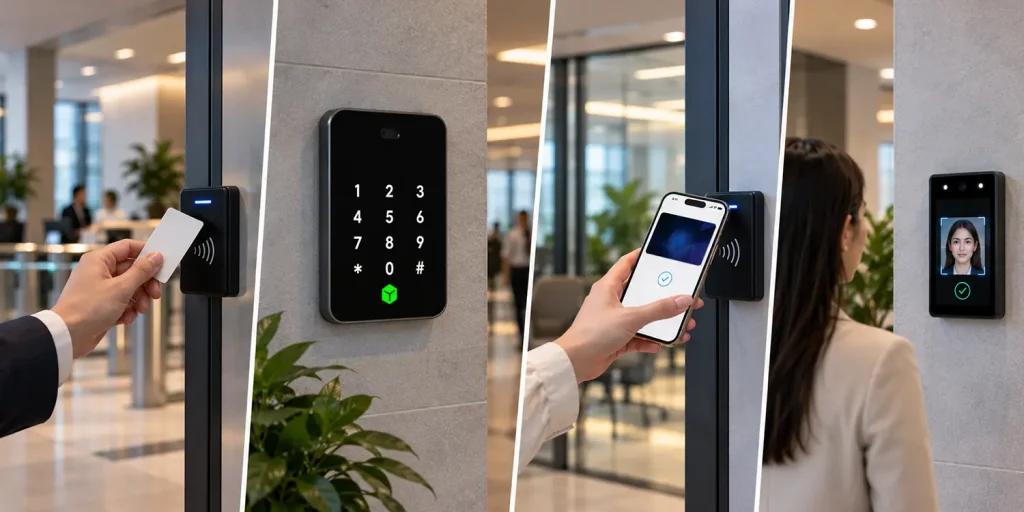
Credentials are what a person presents to prove who they are. They fall into three groups: physical credentials such as smart cards and UHF tags; virtual credentials such as mobile IDs, Apple Wallet and Google Wallet passes, and QR codes; and biometrics such as face, fingerprint, iris, and vein. A PIN can be used alone or as a second factor. IDCUBE’s Access360 manages all of these from a single interface.
Hardware
- Access control points: Any spot where you check who passes through, including doors, turnstiles, speed gates, boom barriers, parking gates, and elevators with floor-level control.
- Readers and biometric devices: Mounted at the access point, they capture the credential and pass it to the controller.
- Controllers: The brain of the system. They store access rules locally, check each credential against them, and tell the lock what to do, even if the connection to the server is lost. Controllers come in single-door and multi-door versions (often 2, 4, 8, or 16 doors). IDCUBE’s platform runs on open controller hardware, including Mercury and Aero boards and its own OpenHEX controller, so you aren’t locked into a single hardware vendor.
- Electromagnetic locks: Where the decision becomes physical. Electric strikes and magnetic locks are the most common. The key choice is fail-safe (unlocks when power is lost) versus fail-secure (stays locked).
- Door sensors and exit devices: Door position sensors tell the system whether a door is open or closed, which is how forced-door and door-held-open alarms work. Request-to-exit (REX) devices let people leave without a credential.
Software
Access Management platform: Where administrators add users, issue credentials, set rules, and monitor doors, alarms, and events across every site in real time. For example, IDCUBE’s Access360.
- Identity database: Every user, their credentials, and their access details in one place.
- Access policies: Who can go where and when, usually grouped into roles, access levels, and schedules.
- Audit logs: A permanent record of every grant, denial, and alarm for investigations and compliance.
- Analytics: Reports and dashboards that turn raw events into insight, such as unusual access patterns or high-risk areas. IDCUBE’s AInsights, for example, scores premises for vulnerability based on several access events.
Supporting infrastructure
- Network: Readers connect to controllers using protocols such as OSDP (Open Supervised Device Protocol) or Wiegand. OSDP supports encrypted, monitored communication, while Wiegand does not. Controllers connect to the management software over the IP network.
- Hosting/Deployment: The software can run on your own servers, in a private cloud dedicated to your organization, in a public cloud, or in a hybrid of these.
- APIs and integrations: Secure APIs and IoT protocols such as MQTT let the platform share data with HR, video, visitor management, and building systems.
Access Control Models: RBAC and RuBAC
An access control model is the logic behind every “yes” or “no” at the door. For physical security, two models do most of the work, and they are strongest when used together.
| Model | How it works | Example |
|---|---|---|
| Role-Based Access Control (RBAC) | Permissions are assigned to roles, and people are assigned to those roles. Change the role, and access changes with it. | Employees with the “Finance” role have access to the Finance floor. When an employee leaves Finance, that access is removed automatically. |
| Rule-Based Access Control (RuBAC) | Access is granted or denied based on predefined conditions such as time of day, day of week, zone, shift, or date range. | Cleaning staff can enter from 7 PM to 10 PM only. A contractor’s credential expires the day the project ends. |
Access Control Credentials and Authentication Methods
Your credential choice decides two things at once: security and convenience. Get it wrong, and you either frustrate your people or leave a gap intruders can walk through.
Smart cards and RFID
Not all cards are equal, and this is one of the most important points here.
- 125 kHz proximity cards are the older type. They transmit a fixed number with no encryption, so they can be cloned easily.
- 13.56 MHz smart cards such as MIFARE DESFire are the secure upgrade, supporting AES encryption and mutual authentication.
- UHF long-range tags (860 to 960 MHz) read from a distance, which makes them common for vehicle access at parking gates.
PINs
A PIN is “something you know.” On its own, it is weak, since PINs get shared. Paired with a card, it becomes a strong second factor.
Mobile credentials
Mobile credentials turn a smartphone into a badge, communicating with the reader over NFC or Bluetooth Low Energy (BLE). NFC works within a few centimeters, which reduces the risk of someone piggybacking on a nearby credential. BLE has a longer range and suits hands-free entry.
People rarely forget their phones, and administrators can issue or revoke access remotely in seconds without printing badges. For example, IDCUBE’s GreenID app; the mobile access control solution delivers mobile credentials alongside visitor and attendance functions.
QR codes
Classic QR codes are suitable for visitors and temporary access. A visitor receives a QR pass by email or SMS and scans it at a credential reader for entry during the approved time. For employees, dynamic QR codes provide secure, smartphone-based access without requiring a physical credential.
Biometrics
Biometrics make the user the credential, so nothing can be lost or shared.
- Fingerprint: widely deployed, compact, affordable, and familiar. Modern scanners can also add liveness detection.
- Contactless fingerprint: captures fingerprints as the hand moves past the reader, combining biometric assurance with touch-free, high-throughput entry.
- Facial recognition: fast and touchless, making it suitable for lobbies, campuses, and hygiene-sensitive sites.
- Palm recognition: identifies users from unique palm patterns, offering a contactless option for convenient, secure access.
- Iris and vein recognition: iris scanners map eye patterns using infrared light, while vein readers map vascular patterns under the skin. Both suit high-assurance areas.
Deployment Options: Cloud (Public and Private), On-Premises, and Hybrid
Where your access control software runs matters as much as what it does.
Myth: “If the internet goes down, cloud-managed doors stop working.”
Reality: In a well-designed system, the door decision is made by the controller in the building, not by a data center. Good controllers cache permissions and schedules locally, buffer events, and resync when the connection returns. Offline behavior varies by vendor, so always ask for it in writing.
Cloud-based access control
The management software and user database live on hosted infrastructure, and you manage everything from a browser or mobile app. This model is often called Access Control as a Service (ACaaS). IDCUBE’s Access360.AI, for example, is delivered as ACaaS on multi-cloud for managing users, credentials, and policies across multiple sites.
On-premises and private cloud
The software and database run on infrastructure you own or that is dedicated to your organization. You get full control over hardware, software, and data, while your IT team owns patching, backups, and upgrades. This suits sites with strict data-sovereignty rules, air-gapped networks, or very high-security zones. IDCUBE offers Access360 Helix as on-premise and private cloud for these environments.
Hybrid
Hybrid keeps local servers or controllers for resilience and sensitive data, while using the cloud for remote management, mobile credentials, and multi-site visibility. It is a popular path for organizations moving to the cloud in phases.
Access Control Integrations
An access control system that works alone delivers only part of its value. Connected to the rest of your systems, it becomes the backbone of your security operations.
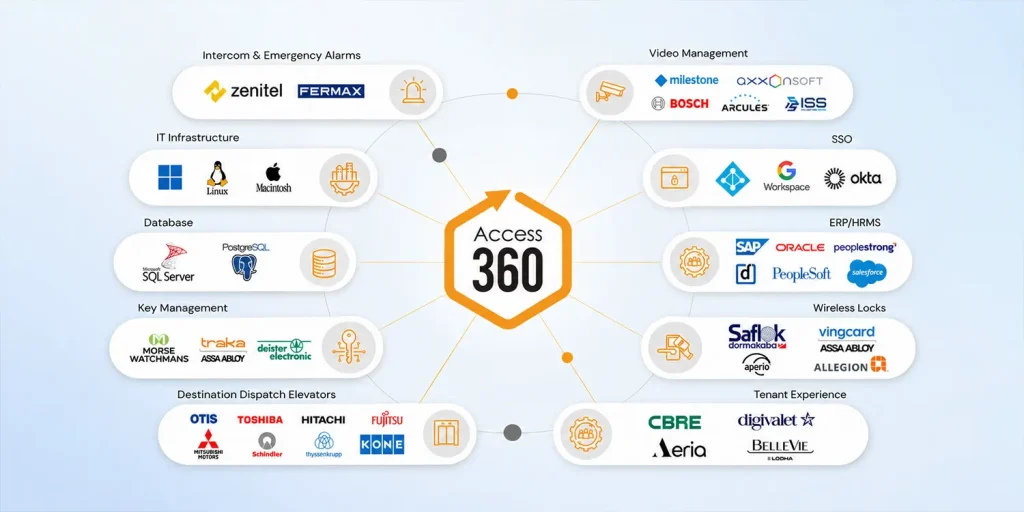
IDCUBE’s Access360 acts as a central integration layer between physical security, enterprise applications, and digital services, connecting through secure APIs and IoT (MQTT) without the need for middleware. By synchronizing identities, credentials, access rights, events, and workflows, it reduces duplicate data entry, removes disconnected processes, and enforces security policies consistently across people, locations, and devices.
- HRMS, payroll, and ERP: Joiners get access on day one, movers get updated permissions, and leavers lose access the same day, all automatically.
- Active Directory, cloud directories, and SSO: One identity per person across IT and physical security, so disabling an account can disable the badge too.
- CCTV and video management system (VMS): When a door alarm fires, operators see the matching video instantly and can control doors from the VMS screen.
- Intrusion detection: An area can arm itself after the last authorized person leaves and disarm when a valid credential is presented.
- Fire panels: Alarm events can trigger door releases along evacuation routes, so people can exit safely during an emergency.
- BMS (Building Management System) and PSIM (Physical Security Information Management): Access data drives lighting, HVAC, and energy use, keeping unoccupied floors on low power, while PSIM brings access events into a unified security view.
- Elevators and destination control: Credentials unlock only permitted floors, with floor rights limited by time of day.
- Intercom: Operators can verify callers and grant entry remotely, with every event logged in the access system.
- Key management: Electronic key cabinets release physical keys only to authorized users and log who took them.
- Front of house (FoH): Visitor entry is handled through pre-registration, host approvals, check-in, and temporary credentials limited to approved doors and time periods. IDCUBE’s ezvisit10 supports this visitor access workflow.
- Business intelligence & Ecosystem integration: Access data feeds, reporting and analytics, while notifications, room bookings, and credentials on Apple Wallet and Google Wallet connect access to everyday workflows.
Benefits of Access Control
The key advantage of physical access control is complete control over every entry point. Everything else flows from that.
- Safer premises: Facility access and sensitive zones are restricted strictly to authorized people.
- Instant credential control: Access for a lost card or departed employee can be revoked immediately.
- Complete visibility: Every entry, denial, and alarm across every site appears in one place, in real time.
- Frictionless access: Mobile credentials, wallet passes, QR codes, and facial recognition let people move through the building quickly without carrying or sharing physical cards.
- Less manual work: Roles, schedules, and HR integrations handle routine permission changes, reducing human error.
- Audit-ready insights: Access logs and security events show who accessed sensitive areas and when, while organized reports help teams investigate incidents, track trends, and support audits.
- Cyber-secure by design: Hardened systems aligned with standards such as SOC 2 Type 2, ISO 27001, ISO 27018, and GDPR protect both physical and digital security and keep operations running without disruption.
- Manage from anywhere: A secure cloud platform lets administrators manage users, sites, and events remotely, suited to hybrid workplaces and distributed teams.
- Lower operating costs: Fewer lost keys, lock changes, and help desk tickets. Access data can also support attendance tracking and space planning.
- Easy multi-site scaling: A new building reuses your existing policy set instead of adding fresh administrative work.
- Faster emergency response: Administrators can lock down a zone or an entire site with one click.
- Smaller carbon footprint: Virtual credentials reduce plastic cards and paper-based visitor processes, while access data can help cut energy use in unoccupied areas.
- Future-ready: An open, system-agnostic platform supports new credential types, devices, and integrations as your needs grow, protecting your investment over time.
Access Control Best Practices
Apply a Zero Trust approach (“never trust, always verify“) across all physical spaces. Never assume a person or device is safe just because they are inside the building. Validate every access attempt in real time.
- Apply least privilege: the default answer to any access request is “no”; access is the exception.
- Build access around roles: assign permissions to job functions, then assign people to roles.
- Layer rules on top of roles: restrict sensitive areas by shift, time of day, and date range.
- Require MFA (Multi-Factor Authentication) for high-risk zones: use card plus PIN or card plus biometric for server rooms, vaults, and labs.
- Phase out cloneable credentials: replace 125 kHz proximity cards with encrypted smart cards or mobile credentials.
- Update access the moment roles change: promotions, transfers, and exits should trigger changes in real time.
- Review permissions regularly: schedule recurring access reviews for high-risk zones to catch stale rights early.
- Monitor and alert in real time: flag repeated denials, forced doors, and doors held open too long.
- Keep complete audit logs: retain every grant, denial, and alarm for as long as regulations and investigations require.
- Test your policies: check real scenarios, such as whether a contractor badge opens the server room at midnight.
- Plan for emergencies: know which doors fail safe, which fail secure, and how people exit during fires or outages.
- Harden system cybersecurity: Secure controllers, readers, and management software against network exploits with encryption, firmware updates, and network segmentation.
Access Control and Regulatory Compliance
Security and privacy frameworks require organizations to restrict access to sensitive areas and prove those controls work. A PACS enforces the restrictions and produces the records auditors need. Always confirm specific requirements with your compliance team or auditor.
| Framework | Relevance to PACS |
|---|---|
| GDPR | Applies to personal data (PII) of individuals in the EU. Access control restricts entry to areas where personal data is stored or processed, and records who entered. |
| Data Privacy & PII Protection | Mandates physical safeguards for facilities housing server rooms, archives, or departments handling Personally Identifiable Information (PII). Access control limits entry to authorized personnel and maintains audit trails of physical access. |
| SOC 2 Type 2 | Evaluates controls that protect customer data. Access permissions, logs, and periodic reviews provide evidence that controls operated as intended, especially for Type 2 audits. |
| ISO/IEC 27001 | Includes physical security controls within an information security management system. Access control restricts entry to sensitive facilities and keeps evidence of activity. |
| VAPT | A proactive cybersecurity audit to evaluate system and software health. It identifies security flaws in access controllers, firmware, management servers, applications, APIs, and connected IoT devices before they can be exploited. |
Access Control Use Cases Across Industries
Every industry uses access control, but each one protects something different.
- Enterprises and corporate offices: Smooth entry for staff, visitor management, floor-level control, and consistent policies across locations. Mobile credentials and HR integration save the most time here.
- Co-working spaces: Members, employees, and visitors share meeting rooms and amenities. Access schedules must stay flexible, with permissions issued, changed, or revoked as memberships and bookings change.
- Business parks: Multiple tenants, employees, visitors, vendors, and vehicles move across several buildings, shared entrances, and parking areas. Each tenant needs its own permissions while common areas stay centrally managed.
- Multi-family housing: Residents, visitors, staff, deliveries, and vehicles are managed across entrances, parking, common areas, and amenities, using mobile credentials and QR guest passes.
- Data centers: Layered security for data halls, NOCs (Network Operations Centers), server rooms, cages, and network spaces, with MFA, anti-tailgating barriers, and traceable access records.
- Education and campuses: Students, faculty, staff, parents, visitors, and contractors across classrooms, laboratories, hostels, and libraries, each with schedule-based access, plus temporary access for events.
- Hospitality: Guest, staff, vendor, contractor, and service access is coordinated so guest-facing areas stay welcoming, while back-of-house spaces, kitchens, stores, and offices stay restricted.
- Healthcare: Hospitals stay open to the public while pharmacies, records rooms, labs, and neonatal wards follow shift-based rules.
- Manufacturing and industrial sites: Access to hazardous zones is limited to trained workers, large contractor workforces are controlled, and muster reports support emergencies.
- Airports, metro rail, and critical infrastructure: High volumes of workers, contractors, and vehicles across wide areas need scalable systems, long-range readers, and tight integration with video and alarms.
How to Choose and Implement an Access Control System
Select a system based on your operational risks, site layout, and future growth, not just a long feature list. Follow these steps to evaluate vendors and ensure a smooth implementation.
Step 1: Assess your security needs
Start with the “why”: stopping theft, passing an audit, protecting staff, or replacing an aging system. Walk every site to map user groups (employees, contractors, visitors, residents, vehicles), doors, gates, high-risk rooms, and current key usage.
Step 2: Define access policies
Translate those findings into roles, schedules, and zone permissions based on least privilege. Clear policies up front make vendor comparisons concrete.
Step 3: Match credentials to risk
Use encrypted smart cards or mobile credentials for general doors, MFA or biometrics for high-security zones, and QR codes for visitors.
Step 4: Evaluate platforms and deployment
Shortlist vendors against these criteria:
- Centralized management: every site, user, and door from one browser or mobile dashboard.
- Deployment fit: cloud, on-premises, or private based on your data rules, budget, and IT capacity.
- Scalability: how the system and its licensing handle your next site, next 1,000 users, and next 100 doors.
- Open integrations and APIs: support for your HRMS, directory, VMS (Video Management System), elevators, and alarms, with open hardware to avoid lock-in.
- Reporting and analytics: ready-made compliance reports and AI-powered dashboards that highlight unusual activity, not just raw logs. IDCUBE’s AInsights, for instance, scores premises for vulnerability based on access events.
- Cybersecurity: encryption, penetration testing, certifications such as ISO 27001 or SOC 2, and protection of biometric data.
- Total cost of ownership: hardware, installation, licenses or subscriptions, credentials, maintenance, IT time, and future upgrades.
Pro tip: Modern access control should protect your premises while keeping everyday operations smooth. Talk to us for an Interactive IDCUBE Demo to explore our end-to-end physical access control solution.
Step 5: Design the system
Plan hardware, network, power backup, and lock behavior door by door while meeting emergency response situations.
Step 6: Integrate, configure, and test
Connect HR, video, and directory systems, then validate permissions, emergency releases, and fail-safes under real-world scenarios. Train administrators and users before going live.
Step 7: Monitor and improve
Audit logs and permissions, track alarm patterns, update firmware, and refine policies as your organization evolves.
Top Physical Access Control Solution Providers
The market is large and growing. Markets estimates the global access control market at USD 10.62 billion in 2025, reaching USD 15.80 billion by 2030 at an 8.3% CAGR.

| Provider | Flagship platform | Known for |
|---|---|---|
| IDCUBE | Access360 (Access360.AI on cloud, Access360 Helix on-premises) | AI-powered physical access control delivered as ACaaS or on-premises, with visitor management, attendance, analytics, and mobile credentials. |
| LenelS2 | OnGuard, NetBox | Commercial and enterprise access control; now part of Honeywell after it acquired Carrier’s Global Access Solutions business for USD 4.95 billion. |
| Genetec | Synergis (within Security Center) | IP access control unified with video and license plate recognition, on open hardware. |
| Honeywell | Pro-Watch Integrated Security Suite | Access control, video, and intrusion in one view for enterprises, airports, and critical infrastructure. |
| Johnson Controls | C•CURE 9000, Kantech EntraPass, CEM AC2000 | Enterprise event management, scalable SMB control, and high-security airport systems. |
| Siemens | SiPass integrated | Scales from a few doors to tens of thousands across multiple sites. |
| Bosch (Keenfinity) | Access Management System, BIS Access Engine | Medium to large and complex projects; Bosch’s security business has operated as Keenfinity since July 2025. |
| Salto Systems | Salto Space, Salto KS | Wire-free electronic locks with data-on-card and cloud options. |
| Acre Security | Feenics | Cloud ACaaS platform built on AWS and open hardware. |
Conclusion: Building a Smarter Access Strategy
Modern physical access control goes beyond locking doors. It gives you full visibility into who enters, where they go, and when, and uses analytics to flag risks before they become incidents.
To maintain high-standard access control security, focus on four moves:
- Get the fundamentals right: combine RBAC with rule-based conditions and encrypted or mobile credentials.
- Centralize control: replace site-by-site systems with one policy-driven platform and a single audit trail.
- Connect your systems: link HR, video, and visitor management so access follows people automatically.
- Modernize step by step: assess risk, phase out cloneable credentials, adopt open platforms, and protect biometric and personal data.
Ready to eliminate security blind spots and modernize your access strategy? Get in touch with IDCUBE to explore how Access360 can transform your physical security.
FAQs
What is access control?
It is the practice of deciding who can enter a space, when, and under what conditions. In physical security, it uses credentials, readers, controllers, and locks to allow or deny entry at doors, gates, turnstiles, and other entry points.
Are physical access control and access control the same?
Not always. Access control is a broad term for controlling who or what can access a resource. Physical access control governs entry to spaces such as doors, gates, and elevators, while logical access control governs access to computer systems, networks, and data.
What are the 3 A’s of access control?
Authentication, authorization, and Accounting (also called accountability). Many frameworks add identification at the start, making it IAAA.
What is the difference between authentication and authorization?
Authentication proves who you are. Authorization decides where you’re allowed to go after that.
What is the difference between RBAC and RuBAC?
RBAC grants access based on a person’s role. RuBAC adds conditions such as time, shift, zone, or date range. Most organizations use both together.
Do cloud-managed doors stop working if the internet goes down?
Not in a well-designed system. Local controllers make door decisions using cached permissions and resync once the connection returns.
How much does an access control system cost?
It depends on the number of doors, hardware, credentials, deployment model, and integrations. Cloud systems usually cost less upfront but carry subscription fees.
What deployment options are best for a physical access control system?
A physical access control system can be deployed on-premises, in a private cloud, or in the cloud, depending on your security, infrastructure, and operational requirements. It also supports modern infrastructure environments, including containerized deployments using technologies such as Docker and Kubernetes. IDCUBE supports all these deployment options.
Which access control credential is the most secure?
No single credential is the most secure for every use case. Security depends on the credential type, reader, authentication method, and risk level of the area. For high-security environments, biometrics or multi-factor authentication can provide stronger assurance than a standalone card or PIN.
What is fail-safe vs. fail-secure locking?
Fail-safe locks release when power is lost, allowing people to exit or enter as required for safety. Fail-secure locks remain locked during a power failure, helping protect restricted areas. The right choice depends on the door, security requirements, fire regulations, and emergency-exit needs.