










How COWRKS Simplified Access Management for 350+ Organizations with IDCUBE
Overview
A co-working space brings different businesses together under one roof. But while the workspace is shared, each company’s people, permissions, and security requirements remain distinct.
For COWRKS, managing those boundaries became an important operational challenge.
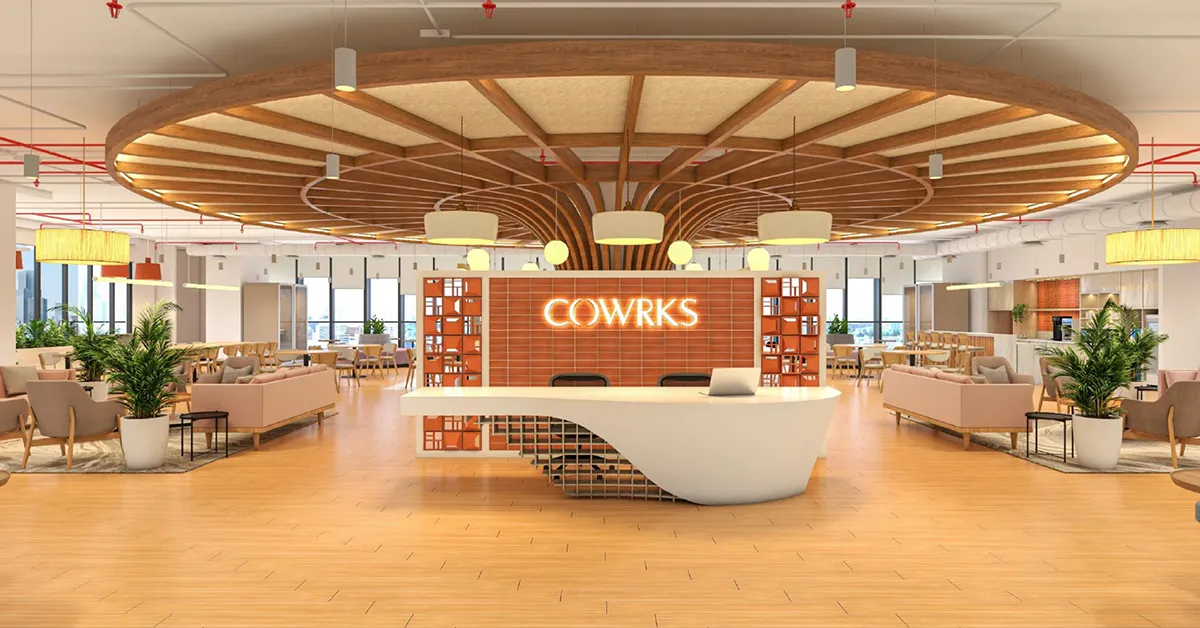
Established in 2016, COWRKS provides flexible office environments designed for businesses with varying workspace needs. Its centres at RMZ Ecoworld and RMZ Infinity in Bengaluru offer private studios, dedicated desks, and flexible seating arrangements.
With approximately 1.6 lakh square feet of collaborative workspace, capacity for over 3,000 members, and tenants representing more than 350 organizations, COWRKS needed an access management system capable of handling a complex, multi-tenant environment.
The requirement went beyond securing entrances. Each tenant needed control over its own employees, while COWRKS facility administrators needed centralized oversight of access activities, attendance, visitors, vendors, and shared spaces.
IDCUBE addressed these requirements by implementing Access360, supported by the ezVISIT client application and integration with the COWRKS mobile app.
The result was a connected access management environment where individual businesses could manage their own users while facility teams maintained visibility across the wider workspace.
COWRKS Deployment at a Glance
350+Tenant organizations
3,000+ Member capacity
450+ Readers and controllers
1.6 lakh Sq. ft. of workspace
Platform: IDCUBE Access360
Visitor management: ezvisit client application
Access credentials: Smart cards, PINs, and Bluetooth
Integration: COWRKS mobile application and Access360 web service
Core capabilities: Multi-tenant access control, attendance, temporary access, meeting-room access, and centralized reporting
These deployment details illustrate the scale of COWRKS’ requirements: hundreds of independent organizations operating within a shared physical environment, supported by a centrally administered security system.
The Challenge
In a conventional office, access permissions generally follow one organization’s security policies. In a co-working environment, hundreds of businesses may operate independently while using the same entrances, common areas, and facilities.
This makes access control considerably more complicated.
COWRKS needed to ensure that employees could enter their authorized areas, visitors could reach their intended destinations, and facility administrators could monitor activity without taking away each tenant’s control over its people.
The challenges extended across several areas.
Managing access for 350+ independent organizations
Each organization had its own employees and access requirements. A single, undifferentiated access-management process would not provide the administrative separation necessary for a multi-tenant workspace.
COWRKS needed a platform that could give tenants responsibility for managing their own employee permissions while keeping overall facility administration centralized.
Protecting the separation between tenant records was equally important.
Maintaining secure access across an extensive infrastructure
With more than 450 readers and controllers, COWRKS needed to manage a substantial physical access network.
Supporting round-the-clock entry meant ensuring that authorized members could move through the workspace while access policies remained enforceable.
Administrators also needed a practical way to configure hardware and review activity without managing each access point as an isolated system.
Making visitor entry more convenient without compromising control
Visitors, vendors, and meeting attendees are an everyday part of a shared workplace.
Unlike permanent employees, these users generally need access for a particular appointment, date, or period.
COWRKS needed to make visitor entry straightforward while preventing temporary credentials from becoming unrestricted access privileges.
Connecting meeting-room bookings with physical access
Booking a meeting room and gaining permission to enter it are closely related activities, but they are not always managed together.
COWRKS required a process through which an approved meeting-room reservation could be associated with access for the reserved period.
This would help ensure that temporary access reflected the actual booking rather than remaining valid indefinitely.
Bringing attendance and occupancy information together
In a multi-tenant environment, access events and employee attendance records can originate from several locations and devices.
COWRKS needed these records to be available centrally for reporting, monitoring, and operational oversight.
The facility team also required visibility into employee and visitor presence across the workspace.
Supporting multiple credential technologies
Not every workspace user enters in the same way.
Permanent employees may use smart cards, while visitors may need temporary PINs. Other access workflows may use Bluetooth-enabled readers.
COWRKS needed these different authentication methods to work within a coordinated access management environment rather than as disconnected arrangements.
Key Operational Requirements
The project therefore called for a system that could:
- Give individual tenants control over employee permissions and attendance reports.
- Provide facility-level administration across the access infrastructure.
- Support controlled entry for employees, visitors, and vendors.
- Generate temporary PIN credentials linked to approved access periods.
- Integrate meeting-room reservations with physical access.
- Connect mobile application requests with access-control workflows.
- Consolidate attendance, access events, and operational reporting.
The central requirement was clear: COWRKS needed to preserve tenant independence without losing facility-wide control.
The Solution
IDCUBE implemented Access360 as the centralized access control platform for managing access permissions, employee attendance, visitor entry, and operational reporting across the COWRKS environment.
The solution also incorporated the ezVISIT client application for visitor workflows and connected with the COWRKS mobile application through Access360 web services.
Rather than requiring separate systems for every organization or visitor category, the deployment brought multiple access processes into a centrally administered environment.
Centralized access management with independent tenant control
One of the most important aspects of the deployment was its multi-tenant administration model.
Each tenant received a personalized Access360 web interface through which designated administrators could manage employee permissions, review access information, and generate time-attendance reports.
Tenant information remained separate, allowing organizations to manage their own employees without accessing another tenant’s records.
At the same time, COWRKS facility managers retained overall administrative capabilities.
They could configure access hardware, add tenants, generate entry and exit reports, and oversee the wider access environment.
This structure created two distinct levels of responsibility: individual organizations managed their people, while the facility team managed the shared infrastructure.
Mobile-integrated visitor access using temporary PINs
COWRKS needed a visitor entry process that could begin before someone reached the workspace.
IDCUBE connected visitor requests initiated through the COWRKS mobile application with Access360’s web service.
Once a visitor request was processed, the system generated a unique request ID and an access PIN. The PIN was communicated to the relevant controller and made available through the mobile interface and SMS.
Visitors could then present their PIN at a compatible reader for verification.
This approach connected visitor approval and physical entry through a single workflow.
Visitor access workflow:
Visitor request (Initiated through the COWRKS mobile app) → Access360 web service (Processes the request and generates a unique ID) → PIN generation and delivery (PIN sent to the controller and shared via mobile interface and SMS) → Authorized visitor entry (Reader verifies the PIN before granting access)
The process reduced the need to handle every approved visitor through a manual entry procedure while retaining credential-based verification at the access point.
Time-bound access for visitors and vendors
Visitor permissions should match the purpose and duration of a visit.
Through Access360, COWRKS could associate temporary credentials with approved dates and times.
This allowed visitors and vendors to use their credentials during authorized periods without receiving unrestricted entry privileges.
It also gave facility teams a more structured way to handle temporary users alongside permanent workspace members.
Meeting-room access linked to reservations
IDCUBE extended the temporary access workflow to meeting-room allocation.
When a meeting room was booked in advance, an appropriate PIN credential could be issued for the reserved period.
This helped align room access with the booking itself, so authorization was based on when the meeting was scheduled rather than simply whether the visitor possessed a credential.
For a collaborative workspace where meeting rooms are shared by multiple organizations, this provided a practical connection between room allocation and access permissions.
Smart-card access and attendance for employees
Permanent employees followed a different access process.
COWRKS used smart-card authentication at compatible readers, allowing authorized personnel to enter the workspace while producing access records.
Within Access360, tenant administrators could manage employee permissions and access time-attendance information through their designated interfaces.
The platform also supported shift management and automated payroll processing, connecting access and attendance data with broader workforce administration needs.
This reduced the separation between securing the workplace and managing employee attendance records.
Support for PIN, Bluetooth, and smart-card technologies
A shared workspace needs flexibility because different users have different access requirements.
The deployment supported multiple credential methods within the Access360 environment.
Smart cards served employee access workflows, PIN credentials enabled temporary visitor and vendor entry, and Bluetooth readers provided an additional supported access technology.
By accommodating these methods, COWRKS could manage different user groups without requiring one identical authentication experience for everyone.
Consolidated access data and facility-level visibility
Access and attendance information collected from multiple nodes was stored centrally within the Access360 environment.
This gave facility administrators a common place to review access events, generate reports, and monitor the operation of the system.
Individual tenants retained visibility into their own relevant employee information, while the facility team could oversee the wider infrastructure.
For COWRKS, this was essential to managing a shared workplace where independent businesses operated within the same facility.
The Impact
The IDCUBE deployment gave COWRKS a more coordinated approach to access management across its multi-tenant workspace.
Instead of treating employee entry, temporary visitor credentials, meeting-room access, and attendance as unrelated processes, the solution connected them through Access360.
1. Centralized control across 350+ organizations
Access360 provided a shared administrative framework for managing access across the workspace.
Individual tenants could manage their employee access rights and reports, while COWRKS administrators maintained control over facility-wide operations.
This balanced decentralized tenant administration with centralized infrastructure oversight.
2. Faster and more organized visitor entry
By connecting visitor pre-approval with PIN generation and credential delivery, COWRKS simplified the process of admitting authorized visitors.
The PDF reports reduced visitor waiting time following implementation.
Visitors could receive access information before reaching a PIN-based reader, creating a more convenient entry experience while preserving verification at the point of access.
3. Greater control over temporary access
Time-bound PIN credentials helped ensure that visitor and vendor permissions aligned with approved schedules.
Rather than treating every visitor as a permanent authorized user, the platform supported access permissions based on the specific purpose and timing of each visit.
This introduced clearer boundaries for temporary access within the shared facility.
4. More practical meeting-room access
Linking room reservations with temporary credentials made meeting-room entry easier to administer.
Access could be associated with the period for which the room was reserved, helping COWRKS coordinate shared space usage and physical entry.
5. Simplified employee access and attendance administration
Smart-card authentication supported employee entry, while tenant-specific Access360 interfaces enabled administrators to manage access rights and attendance reports.
With support for shift management and automated payroll processing, the platform also connected attendance records to workforce administration.
6. Improved operational visibility
Centralized collection of access and attendance records gave COWRKS facility teams a consolidated view of information generated across multiple access nodes.
This supported event handling, reporting, system monitoring, and oversight of facility access activity.
7. Flexible access experiences for different users
Employees, visitors, and vendors did not need to follow the same entry process.
The deployment supported smart-card, PIN-based, and Bluetooth access methods, allowing credential workflows to reflect different user requirements within the workspace.
Conclusion
A successful co-working environment depends on making shared infrastructure work for businesses that operate independently.
For COWRKS, that meant more than installing access readers at entry points. The organization needed a way to manage hundreds of tenants, protect the separation of their employee records, authorize temporary visitors, connect meeting-room bookings with access permissions, and maintain visibility across its facilities.
IDCUBE’s Access360 implementation brought these requirements together through a centralized access management platform supported by visitor management and mobile application integration.
With more than 350 tenant organizations, a member capacity exceeding 3,000, and an infrastructure involving over 450 readers and controllers, the deployment demonstrates how multi-tenant access control can support the operational complexity of large collaborative workspaces.
The outcome was a more manageable access environment in which tenants retained administrative independence, visitors benefited from streamlined entry, and facility teams gained centralized oversight.
For co-working operators, the COWRKS deployment illustrates an important principle: an effective security system should do more than restrict entry. It should make it easier for the right people to access the right spaces at the right time.
Frequently Asked Questions
How does COWRKS manage access control for multiple tenant organizations?
COWRKS uses IDCUBE Access360 to centrally administer its access infrastructure while providing each tenant with a personalized web interface. Tenant administrators can manage employee access permissions and reports independently, with their information kept separate from other organizations.
How many organizations are supported by the COWRKS access control deployment?
The case study describes a workspace serving tenants from more than 350 organizations, with capacity for over 3,000 members and an access infrastructure involving more than 450 readers and controllers.
How does visitor management work at COWRKS?
Visitor requests can be initiated through the COWRKS mobile application and processed through Access360 web services. The system generates a unique request ID and access PIN, which is delivered through the mobile interface and SMS. Visitors use the PIN at a compatible reader for authorized entry.
Can visitors receive access for a limited period?
Yes. Access360 supports time-bound PIN credentials that can be linked to approved dates and times, helping restrict visitor and vendor entry to authorized periods.
How does IDCUBE support meeting-room access at COWRKS?
The solution allows meeting-room bookings to be associated with temporary access credentials. Visitors can receive a PIN that permits entry during the reserved period.
Which access credentials are supported by the deployment?
The COWRKS deployment supports smart cards, PIN-based credentials, and Bluetooth reader technology for different access workflows.
Can each tenant manage employee attendance separately?
Yes. Each tenant receives a personalized Access360 interface to administer employee permissions and generate access-control and time-attendance reports.
How does Access360 help COWRKS facility administrators?
Access360 consolidates access and attendance information from multiple nodes, supporting facility-wide reporting, hardware configuration, tenant administration, event handling, and monitoring.
Does the COWRKS access management system integrate with its mobile app?
Yes. The deployment connects the COWRKS mobile application with Access360 web services to support visitor access requests and PIN-based credential delivery.
What were the main benefits of the IDCUBE implementation?
The documented benefits include centralized multi-tenant administration, reduced visitor waiting time, controlled temporary access, simplified meeting-room entry, employee attendance management, centralized operational visibility, and support for multiple access technologies.